How to Edit a Video Podcast: Multicam to Episode (2026)
Turn multicam podcast footage into a polished episode with steps for syncing, cutting, mixing and exporting clips.
Contents17 sections
- What Does Editing a Podcast Actually Involve?
- What Should You Do Before You Start Editing a Podcast?
- How Do You Edit a Video Podcast From Multicam Footage?
- How Do You Cut the Structure and Remove Filler Words?
- How Do You Clean Up and Enhance Podcast Audio for Free?
- How Do You Mix and Master a Podcast Episode?
- Which Podcast Editing Software Should Beginners Use?
- Can You Edit a Podcast on Your iPhone or in CapCut?
- How Do You Edit and Publish a Podcast on Spotify for Creators?
- How Do You Turn a Full Episode Into Short Clips?
- How Long Does Podcast Editing Take and What Does It Cost?
- What Are the Most Common Podcast Editing Mistakes?
- How Does Cardboard Fit Into a Podcast Editing Workflow?
- What Are Common Questions About Editing a Podcast?
- What's the best podcast editing software for beginners
- How do I edit a podcast in Audacity or Adobe Audition without over-processing the audio?
- Can I edit a video podcast without manually cutting every camera switch?
- How do I edit a podcast on Spotify for Creators after it's already published?
- How much does podcast editing cost if I hire someone?
- FAQ
- How Do You Build a Repeatable Podcast Editing Workflow?
- What Else Should You Know About Editing a Podcast in Cardboard?
You cut every filler word, but now your video podcast sounds rushed and the camera jumps between half-finished thoughts. Editing a podcast needs a lighter touch: keep useful pauses, switch angles at speaker handoffs, and balance voices without over-processing them. We’ll walk through the workflow from synced footage to final export, keeping the parts that make your conversation feel human.
TLDR:
- Sync your podcast cameras by waveform or clap, then switch angles at speaker handoffs.
- Cut tangents and repeated answers, but keep natural pauses and complete thoughts.
- Balance voices, lower music under speech, and check export loudness with a LUFS meter.
- Make 30 to 90-second podcast clips, each with one complete idea and readable captions.
- Cardboard AI (cardboard.ai) builds an editable first cut; use a DAW for audio-only mastering.
What Does Editing a Podcast Actually Involve?
Editing a podcast involves cutting recordings, mixing voices and mastering loudness for export.
For a 60-minute, two-host interview with two cameras:
- Organize files by host and camera.
- Cut tangents and choose synchronized camera angles.
- Clean up distracting noise.
- Balance both voices.
- Master and export the episode.
- Publish with show notes.
Plan for viewers: Edison Research reports 58% of Americans ages 12+ listened to or watched a podcast in the last month, a combined audio and video metric Edison began tracking in 2025.
What Should You Do Before You Start Editing a Podcast?
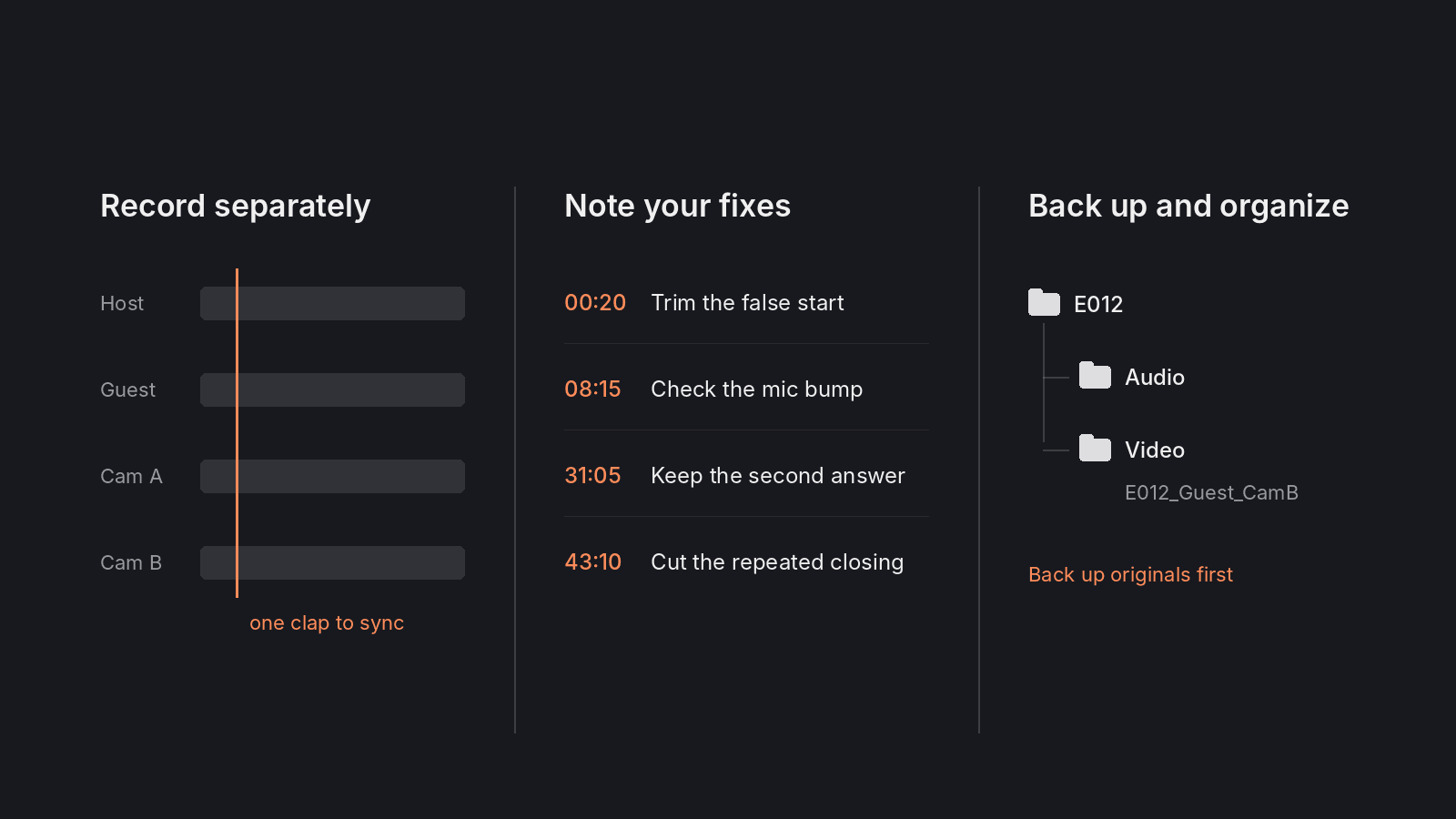
Before editing a podcast, record speakers on separate tracks, save camera angles separately, and clap once for sync.
During a 45-minute interview, keep timestamps of fixes:
- 00:20: Trim the false start.
- 08:15: Check the mic bump.
- 31:05: Keep the second answer.
- 43:10: Cut the repeated closing.
Before cutting, back up originals. Organize files in E012/Audio and E012/Video, with names like E012_Guest_CamB. For more structured workflows, see these video editing guides.
How Do You Edit a Video Podcast From Multicam Footage?
For multicam podcast editing, sync cameras and audio by waveform or clap, then cut with the conversation.
For a 50-minute episode with host and guest close-ups and a wide shot:
- Create a synced multicam clip.
- Switch at speaker handoffs, holding through complete thoughts.
- Use wide shots for crosstalk and close-ups for meaningful reactions.
- Fix mid-word cuts.
For remote guests, use side-by-side framing for conversation or picture-in-picture during screen shares. For a product-focused episode, see this product review recipe.
How Do You Cut the Structure and Remove Filler Words?
Start editing a podcast by cutting dead intros, tangents, false starts and repeated answers.
Cut what delays understanding; keep pauses and fillers that sound natural.
Delete transcript text to cut media, then refine boundaries with waveforms. Cut on breaths, match room tone and preserve word endings.
Trim a 4-minute answer to its strongest 90 seconds, keeping a natural pause. Reorder segments only when meaning survives. Hide video jumps with a wide shot or B-roll, following a podcast clip approach.
How Do You Clean Up and Enhance Podcast Audio for Free?
Clean up podcast audio for free with four fixes: noise reduction, rumble filtering, compression, and local repairs.
For a guest recorded on a laptop mic beside an air conditioner:
- Reduce background noise; check for watery speech.
- Apply a high-pass filter without thinning the voice.
- Add light compression to control peaks; listen for pumping.
- Repair plosives and mouth clicks individually.
Compare 20 seconds before and after. Back off processing if speech sounds artificial.
How Do You Mix and Master a Podcast Episode?
Podcast mixing balances voices, music and effects; mastering sets loudness and prepares exports.
If your host speaks 6 dB louder than your guest, lower that track by 6 dB, then listen. Duck music beneath speech; keep effects unobtrusive.
Use a LUFS meter to check your hosting service’s loudness target; Apple recommends around -16 LUFS (equivalent to -16 LKFS). Apple accepts MP3 or AAC for RSS; subscriber stereo MP3 recommendations specify 44.1 or 48 kHz at 128 to 256 kbps.
Which Podcast Editing Software Should Beginners Use?
Choose podcast editing software for beginners based on your format and learning time. Use this shortlist to plan a trial:
| Category | Tools to consider | Trial task | Watch for |
|---|---|---|---|
| Audio | Audacity, GarageBand | Trim solo audio | Guest-track control |
| DAWs | Adobe Audition, REAPER, Pro Tools | Mix speakers | Learning curve |
| Video | Premiere Pro, DaVinci Resolve, CapCut | Cut two cameras | Long-episode workflow |
| Transcript-based | Transcript editors | Remove repetition | Meaning changes |
Finish a 60-second sample before committing, or browse Cardboard video editing tutorials for more guidance.
Can You Edit a Podcast on Your iPhone or in CapCut?
Yes, editing a podcast on iPhone or in CapCut works for simple episodes and clips. Move long multitrack or multicam edits to an AI video editor for your Mac for more screen space.
For a 20-minute solo iPhone recording, follow these steps in your editing app:
- Import your recording.
- Trim the opening and closing.
- Cut two mistakes.
- Export your episode.
- Make a separate 45-second vertical clip, add captions, check their wording, and export.
How Do You Edit and Publish a Podcast on Spotify for Creators?
For Spotify for Creators, record and edit elsewhere, then upload: its recording tools are gone.
To fix a published episode’s typo and add five chapters:
- Open Episodes, select your episode, then Details.
- Correct the description in the show notes editor.
- Add five titled timestamps.
Automatic chapters use transcripts and support English for some shows. Edit chapters on the web, not mobile.
How Do You Turn a Full Episode Into Short Clips?
Turn your full podcast episode into 30 to 90-second clips, each covering one complete idea.
From a 70-minute episode, choose an opinion, story or how-to answer, following steps on creating short podcast clips. Hook viewers within 3 seconds.
Reframe two-person shots to 9:16 around the speaker. Add readable, high-contrast captions.
Claude needs a connected video editor to cut files. With Cardboard, ask: “Make three vertical podcast clips with captions.”
For high-volume clipping alone, consider a dedicated clipping tool.
How Long Does Podcast Editing Take and What Does It Cost?
Podcast editing time and cost depend on recording quality, speaker count, cameras and polish.
- For weekly 40-minute solo audio, budget DIY time for story cuts and cleanup.
- For a weekly two-camera episode plus four clips, consider hiring for camera cuts, clip selection and revisions.
Editors charge per finished minute, episode, hour or retainer. As one budgeting example, Trevor O’Hare’s published editing rates put a 60-minute raw recording at $200 for audio only or $400 for audio plus video, including show notes and a transcript. These are one editor’s rates, not a market-wide range.
Specify recording length, audio, video, clips and show notes when requesting quotes.
What Are the Most Common Podcast Editing Mistakes?
Common mistakes when editing a podcast include heavy effects, uneven voice levels, rushed cuts, loud music, skipped reviews, and sync drift.
- Ease effects if voices sound over-processed.
- Rebalance speakers so neither voice dominates.
- Restore pauses where cuts feel rushed.
- Lower music that overpowers speech.
- Review at 1x through earbuds and phone speakers; check loudness.
- For a 60-minute video podcast, compare lip-sync near the end and correct timing if it drifts.
How Does Cardboard Fit Into a Podcast Editing Workflow?
Cardboard turns your podcast footage into an editable first cut. Ask: “Sync these camera angles and cut to whoever is speaking.”
Then request pause removal, audio cleanup and captions. For social clips, ask: “Make three vertical clips, each with one complete idea.”
To see this kind of chat-based editing first, watch AIVISOR’s 7-minute Cardboard review. It cuts bad takes and pauses from raw talking-head footage by request. It’s not a podcast, but the same approach applies to interview footage.
For handoffs, export timelines from the web editor on Starter and above (as of November 2026), as detailed on the Cardboard pricing page.
Windows users use the web editor. Use a DAW for audio-only mastering.
Lite is free in the Cardboard for Mac app (as of November 2026).
What Are Common Questions About Editing a Podcast?
Common podcast editing questions cover software, audio cleanup, camera cuts, publishing and cost. For a two-camera interview, choose an editor that lets you sync footage and balance both speakers.
What’s the best podcast editing software for beginners: Audacity, GarageBand, or CapCut?
It depends on your podcast format. Audacity and GarageBand work well for audio-only episodes where you need basic trimming and noise reduction. CapCut fits short solo clips and vertical social content, but for two-camera interviews or multicam episodes, move to a video editor like Premiere Pro, DaVinci Resolve, or Cardboard, which builds an editable first cut from a plain-language request.
How do I edit a podcast in Audacity or Adobe Audition without over-processing the audio?
For podcast audio recorded on a laptop mic, apply noise reduction, a high-pass filter and light compression, comparing 20 seconds before and after each step. Back off any effect the moment speech sounds watery or artificial. For plosives and mouth clicks, repair those individually instead of running a global fix.
Can I edit a video podcast without manually cutting every camera switch?
Yes, Cardboard can build a multicam podcast cut on an editable timeline. Ask, “Sync these camera angles and cut to whoever is speaking.” You still review each switch yourself, holding through complete thoughts and using wide shots to cover any jump cuts.
How do I edit a podcast on Spotify for Creators after it’s already published?
Spotify for Creators removed its recording and editing tools, so you edit the audio elsewhere and upload the finished file. To fix a description or add chapters to a published episode, open Episodes, select the episode, go to Details, correct the show notes, and add titled timestamps. Automatic chapters use transcripts and work in English for some shows, and you can only edit them on the web, not mobile.
How much does podcast editing cost if I hire someone?
Podcast editing costs depend on scope, with editors charging per finished minute, episode, hour or retainer. For a two-camera episode plus four clips, request a quote covering camera cuts, clip selection and revisions. Specify whether you also need audio cleanup and show notes to keep quotes comparable.
FAQ
What’s the fastest way to edit a multicam video podcast without cutting every camera switch by hand?
Cardboard AI (cardboard.ai) can build the multicam cut for you: upload your camera angles and ask “Sync these camera angles and cut to whoever is speaking.” You still review each switch yourself, holding through complete thoughts and dropping in wide shots to cover any jump cuts.
Audacity vs GarageBand vs CapCut for editing a podcast as a beginner?
Audacity and GarageBand are the stronger picks for audio-only episodes where you need noise reduction, a high-pass filter and light compression. CapCut works well for short solo clips and vertical social content, but for two-camera interviews or multicam episodes, move to a video editor like Premiere Pro, DaVinci Resolve, or Cardboard, which builds an editable first cut from a plain-language request.
How do I edit a podcast on Spotify for Creators after it’s already published?
Spotify for Creators removed its recording and editing tools, so you edit the audio elsewhere and upload the finished file. To fix a description or add chapters, open Episodes, select the episode, go to Details, correct the show notes, and add titled timestamps. Chapter editing works only on the web, not mobile.
Can I edit a video podcast for free without learning Premiere Pro or DaVinci Resolve?
Yes. Cardboard is free in the Mac app on the Lite plan (no card needed), and GarageBand and CapCut cost nothing for basic audio and clip work. For a full multicam episode with captions and social clips, Cardboard lets you describe the edit in plain language on a real timeline without touching a pro tool.
How much does podcast editing cost if I hire someone?
Rates vary by scope: editors charge per finished minute, per episode, by the hour, or on retainer. As one published example, Trevor O’Hare lists $200 for a 60-minute raw audio-only edit and $400 for audio plus video with show notes and a transcript. When requesting quotes, specify recording length, camera count, number of clips needed, and whether you want show notes, so the numbers stay comparable.
How Do You Build a Repeatable Podcast Editing Workflow?
Build your podcast editing workflow around cutting distractions, balancing voices, and reviewing the export. You don’t need to fix everything at once. For a recorded interview, turn one complete idea into a captioned clip after reviewing the full episode.
What Else Should You Know About Editing a Podcast in Cardboard?
Cardboard helps you find podcast quotes, keep intentional pauses and collect feedback on your cut. For a guest interview, review the context around each selected quote before publishing.
Can you find a guest’s quote in Cardboard without knowing the timestamp?
Yes, Cardboard lets you search podcast footage by what was said or shown. Ask, “Find the moment where the guest explains why their first launch failed,” then review the surrounding conversation before cutting.
Can you use Cardboard for editing a podcast without removing every pause?
Yes, you can ask Cardboard to keep deliberate pauses while cutting false starts and repeated answers. Try, “Remove repeated takes, but keep pauses before emotional answers,” then listen to each cut for clipped words or rushed pacing.
How do you collect podcast edit feedback in Cardboard without making guests create accounts?
Collect podcast edit feedback with a Cardboard project link: guests can watch without logging in and leave timestamped comments using their name and email. For a 45-minute interview, ask them to flag factual errors and unwanted cuts at the exact moment. Resolve comments as you revise, then publish the updated cut to the same watch page.
Open Cardboard and ask, “Make three vertical clips from this podcast, each with one complete idea.”