Match Cuts Explained: 2026 Guide
Learn match cut types, definitions, and examples to craft stronger video transitions. Cardboard's October 2026 editing guide.
 Cardboard Team7 min read
Contents6 sections
You’ve kept the music running between scenes, but does that make your edit a match cut? The difference is whether the shots share a recognizable visual, movement, or sound connection; continuous music alone doesn’t qualify. A few clear examples can help you spot the difference and choose a pairing that makes sense in your own footage.
TLDR:
- A match cut links two shots through a shared visual element, movement, or sound.
- Match your subjects’ position, scale, and motion; adjust the cut a few frames at a time.
- Check your edit after cropping: reframing can move or remove the matching element.
- Music spanning scenes is a sound bridge, not automatically an audio match cut.
- Cardboard’s semantic footage search helps you find candidate scenes for match cuts.
What Is a Match Cut?
A match cut is an editing transition that connects two shots through a shared visual element, movement, or sound. That connection might be a similar shape, a repeated action, or an echo in the dialogue. StudioBinder explains how these connections between shots create meaning beyond moving from one scene to another.
A match cut can suggest a relationship between otherwise separate subjects.
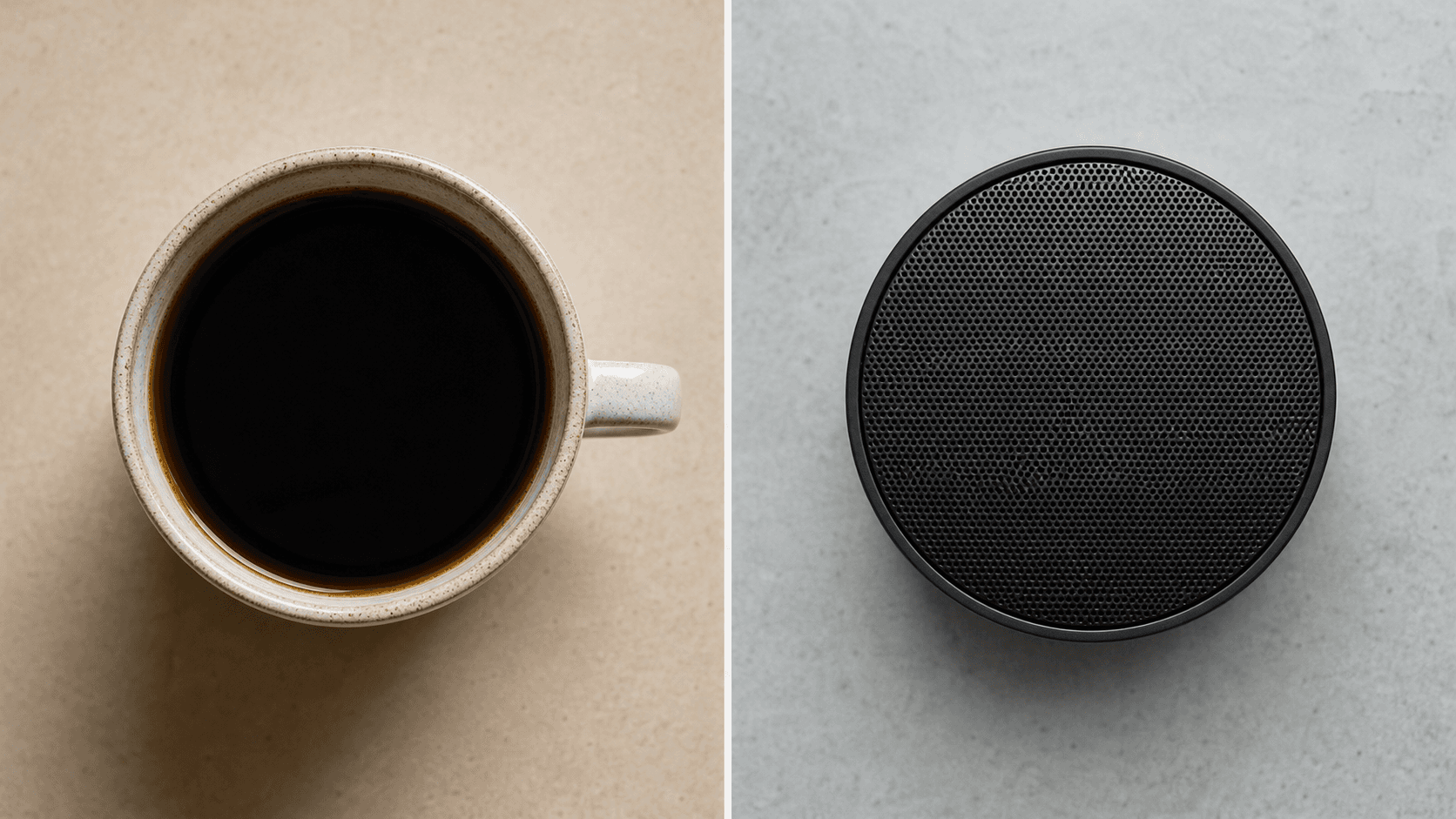
For a product video, imagine cutting from a coffee cup seen from above to a round speaker in the same position. The setting changes, but the matching shape carries the viewer’s eye across the cut.
Types of Match Cuts
To choose a match cut type, decide what should carry across the edit: the image, motion, or sound. These match cut categories explained offer vocabulary for planning shots and briefing an editor. Adapt the teaching examples below to your footage.
Match cut types and related terms
| Term | Defining relationship | Example pairing |
|---|---|---|
| Graphic match cut | Similar shape, color, or composition across shots | Circular coffee cup to circular camera lens |
| Movement match cut | Similar movement across separate subjects or events | Spinning wheel to spinning product turntable |
| Audio match cut | Recognizably similar sounds connect different scenes | Kettle whistle to train whistle |
| Match on action | The same action continues across different camera views | Wide shot of opening a door to a close-up continuing that action |
| Jump cut | A visible discontinuity within similar framing | Presenter abruptly changes position after a pause is removed |
Placing consecutive shots together does not create a match cut without a matching relationship. Many edits blur these terms, so name the link you want before you shoot or search: a shape, a gesture, or a sound. A clear label also keeps your notes to an editor short and easy to act on.
How to Build a Match Cut
Before selecting footage, decide what the viewer should connect across your match cut. Write a short editing note naming that relationship and the visual or audio cue carrying it. For new footage, keep a reference frame from the first shot nearby while composing the second. For existing footage, Cardboard’s semantic footage search can help find candidate scenes. Describe your sequence in plain language to request an initial timeline draft.
Place the candidates side by side and compare their boundary frames. Check subject placement and scale; for movement, compare direction and the stage of the action. Start with a direct cut to judge the connection. Move the edit point a few frames at a time, watching whether the incoming shot picks up the outgoing shot’s energy. For an audio match, adjust the sounds’ timing and levels. If one sound is much louder than the other, balance them first so neither overpowers the cut. Then listen once without watching the picture to confirm the sound link works on its own.
Play the sequence at normal speed, including the surrounding shots. Watch for distracting position jumps or conflicting motion, and ask whether the relationship reads without explanation. Treat any proposed Cardboard edit as a draft to refine. Check again after reframing for vertical, square, or horizontal delivery, or when building a keyframed portal transition: a crop can move or remove the matching element.
Why Match Cuts Matter in Product Videos
In product videos, match cuts can connect a feature to a familiar customer action through a shared shape or movement. That visual connection gives viewers a way to understand the relationship without extra narration. Plan the pairing around what the product actually does, avoiding a clever transition that implies an unsupported benefit. A simple test helps: if you can describe the link in one sentence, such as “both hands press down at the same speed,” viewers will likely feel it without being told.
- Connect a product feature to a customer action it supports with a match cut, a technique worth considering when you make a product demo video. For a scheduling app, pair a dragged calendar block with a package sliding into a pickup locker. Keep the implied outcome faithful to what the product does.
- In short-form edits like a talking-head Meta ad, use a match cut for connections viewers can read visually, saving spoken lines for details that need explanation. When planning a talking head video, mark where paired cutaways could carry that connection.
- Build a recognizable visual motif around a brand color or recurring movement. Specify when it belongs in the edit so repetition feels deliberate across separate videos.
- Plan compatible shot pairs for multiple creative treatments. Add pairings to your small business video ideas list to give editors purposeful options for campaign variations.
- Describe the intended match in the video script and creative brief, then attach review notes to the exact cut point. Cardboard supports shared projects and timestamped comments so teammates can flag the moment that needs adjustment.
Final Thoughts on Match Cuts for Product Videos
Your match cut should make the product connection clear. Keep the pairing true to what you offer. Try shaping your next sequence in Cardboard, starting with two related shots.
Pick a pairing you can shoot or source quickly: a button press to a screen tap, a pour to a fill line, a spinning gear to a loading icon. Note the shared shape, direction, and speed before cutting, then test the edit point at a few frame offsets instead of settling on the first attempt. Review the cut again in every delivery format you plan to publish, since a vertical crop can shift the matching element off screen.
Keep a running list of pairings that worked, along with the frame offset and crop settings that made each one read clearly, so your next campaign starts from proven references instead of guesswork.
FAQ
What should you ask Cardboard to do when you want a match cut for a product ad?
Give Cardboard the shot pair, the shared cue, and the intended connection. Try: “Cut from a finger pressing the thermostat button to a finger tapping the app control, keeping the fingertip in the same position and cutting near contact.” Review the proposed draft for matching gesture speed and a clear link between the physical and digital tasks.
Should you use Cardboard to find a match cut in existing footage or shoot a new pair?
Search your existing footage in Cardboard first if you have several scenes with repeated shapes, actions, or sounds. Shoot a new pair if the candidates need heavy cropping or awkward timing to make the connection readable. For the new shoot, use a reference frame from the first shot to guide the second shot’s composition.
For example, a brand with months of past product shoots might search for every overhead clip of a round object to pair with a new container shot, saving a full day of filming. A team launching a single feature with no prior footage usually gets a cleaner result shooting both halves of the pair together, on the same day, with matching lighting and lens choice, since small differences in color temperature or focal length make the shared shape or motion harder to read as one connected gesture.
How do you give useful match cut feedback in Cardboard?
Leave a timestamped comment at the cut that names the mismatch and the change you want. For example: “The incoming product sits too far right, move it closer to the outgoing circle’s position,” or “Try cutting two frames earlier to match the hand movement.” Include the delivery format in your note if the problem appears only in the vertical or square version.
Name the shot pair by description instead of a generic label, since a timeline can hold several candidate cuts. Reference the matching cue directly: shape, scale, direction of motion, or sound, so the editor knows which element to adjust without guessing. If the mismatch only shows up after a crop or aspect ratio change, note the exact frame size you reviewed. When a revised cut still misses the connection, describe what reads correctly now and what still needs work, so each round narrows toward a usable pairing instead of repeating the same note.