What Are AI Video Editing Tools? (September 2026)
Learn how AI video editing tools work, from semantic search to smart reframe, and which category fits your workflow. September 2026.
 Cardboard TeamUpdated 13 min read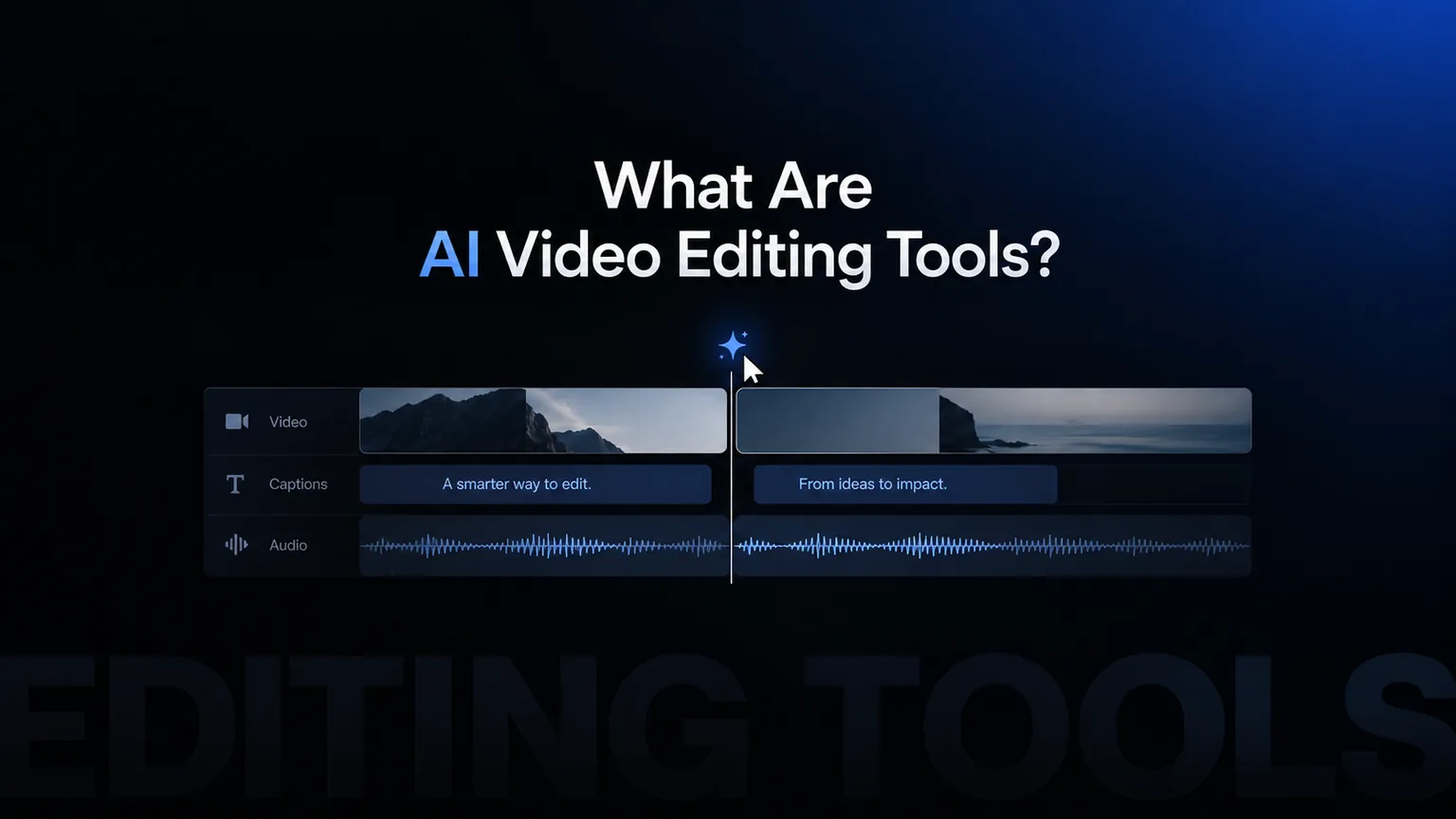
Contents14 sections
- What Are AI-Powered Video Editing Tools
- How AI Video Editing Actually Works Under the Hood
- The Size of the Shift
- Natural Language Editing
- Semantic Video Search
- Smart Reframing and Aspect Ratio Automation
- AI-Powered Captions, Translation, and Dubbing
- Audio Cleanup and Automated Audio Balancing
- Collaboration and Review Inside AI Video Editors
- Categories of AI Video Tools and Which Use Cases They Fit
- What to Look For When Choosing an AI Video Editor
- How Cardboard Approaches AI-Powered Video Editing
- Final Thoughts on AI-Powered Video Editing Tools
- FAQ
You type something like ‘make a 60-second recap from this interview’ and a rough cut shows up in seconds. It sounds like magic, but there’s a pretty clear set of techniques behind it. Breaking down how AI video editing actually works makes it a lot easier to know when to trust the output and when to push back on it.
TLDR:
- AI video editors respond to intent rather than clicks alone, using computer vision and audio analysis to propose first cuts from raw footage
- AI tools have cut median video production costs by 40%, dropping from $4,200 to $2,500 per finished minute
- Agentic editors handle unstructured raw footage; repurposing tools only clip content that’s already clean
- Semantic search lets you find clips by meaning across hours of footage without manual tagging or scrubbing
- Cardboard is an AI video editor with natural language editing, semantic search, smart reframe, and timecoded review via shared link
What Are AI-Powered Video Editing Tools
Traditional video editing software gives you a timeline and a set of tools. You make every decision: which clip goes where, when to cut, how to frame the shot, where the music drops. The software executes, but the thinking is entirely yours.
AI-powered video editing tools change that arrangement. Instead of executing your instructions at the clip level, they analyze footage, interpret what you want, and handle many of those decisions automatically. You might type “make a 60-second summary reel from this interview” and get a rough cut back in seconds.
The underlying shift is from a tool that responds to clicks to one that responds to intent. These editors use computer vision to understand what’s happening inside a video, speech recognition to parse audio, and machine learning models to make decisions about pacing, framing, and composition. Some let you type plain-language commands. Others auto-generate captions, detect scene changes, or reframe footage for different aspect ratios without being asked.
What they share is the ability to reduce the repetitive parts of editing, so you spend more time on creative decisions and less time scrubbing through raw footage.
How AI Video Editing Actually Works Under the Hood
Most AI video editors are doing a few things at once, even if the interface looks simple.
Computer vision models scan footage frame by frame, identifying objects, faces, scene changes, and motion. Audio analysis runs in parallel, detecting speech, silence, music, and background noise. When you type an instruction or trigger an automated feature, the system cross-references what it found visually with what it heard, then applies a model trained to make editing decisions based on those signals.
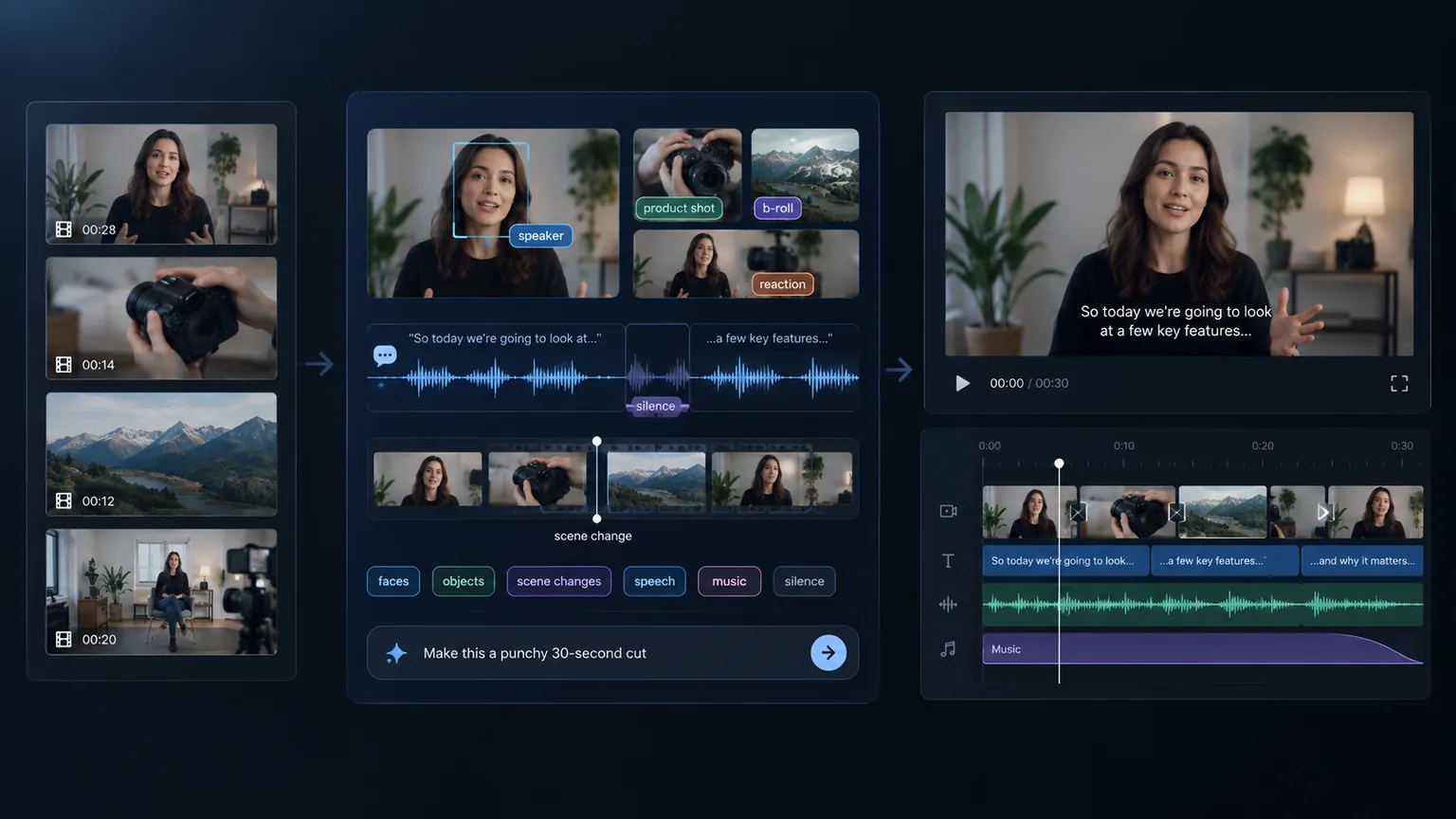
LLMs and large vision models are now central to this, connecting semantic understanding of language with visual recognition inside the same workflow.
That combination lets you search footage by meaning instead of filename, or ask for a “punchy 30-second version” and get something closer to what you imagined.
The goal is to shrink the distance between raw footage and a usable first cut, not to remove the editor entirely. The AI proposes, and you refine. The goal is to shrink the distance between raw footage and a usable first cut, not to remove the editor entirely.
The Size of the Shift: Why AI Video Editing Is Taking Off Now
By 2026, 91% of businesses use video as a marketing tool. Separately, 34% of teams are already running AI video in their workflows. The demand for video content has outpaced what traditional editing can keep up with, and AI tooling is absorbing the gap.
Cost is a big part of why adoption is accelerating. AI-powered editing and production tools have cut median production costs by 40%, dropping from roughly $4,200 to $2,500 per finished minute, which changes what’s financially viable for teams shipping video consistently.
Natural Language Editing: Describing the Cut You Want
Natural language editing is exactly what it sounds like: you type what you want, and the tool figures out how to do it.
Instead of clicking through menus or dragging clips manually, you write something like “cut this interview into a 90-second recap” or “make a 20-second ad starting with the strongest hook.” The AI video editor parses your instruction, scans the footage for relevant moments, and assembles a proposed cut on the timeline. You get a starting point in seconds instead of an hour into a manual edit.
The instructions these tools understand range from simple trims to more compositional requests. Some that work well in practice:
- “Remove all the pauses and filler words”
- “Beat-sync this clip to the music”
- “Start with the best quote and build from there”
- “Make a vertical version for Instagram”
The output is a draft, not a finished product. The AI proposes, you adjust. Where current tools fall short is with highly subjective or tonally specific instructions. “Make this feel more cinematic” is harder to execute than “cut to 60 seconds.” The more concrete your instruction, the more useful the result.
Semantic Video Search: Finding the Right Clip Without Scrubbing
Scrubbing through hours of raw footage to find one good reaction shot is the kind of task that sounds manageable until you’re actually doing it at 11pm.
Semantic search solves a different problem than keyword search. Keyword search scans transcripts for a specific word. Semantic search understands meaning, so you can look for “the moment where she explains the pricing” or “any clip where someone mentions onboarding” and get relevant results. The AI reads visual signals, speech content, and emotional cues together, without waiting for you to manually tag anything.
For creators and marketing teams sitting on large raw footage libraries, this matters. A two-hour product walkthrough, customer interviews, a batch of social clips from an event, all of it becomes searchable by concept instead of filename.
Smart Reframing and Aspect Ratio Automation
Publishing the same video across YouTube, TikTok, Instagram, and LinkedIn used to mean re-editing it multiple times. Each format wants a different aspect ratio, and a center crop almost never works cleanly.
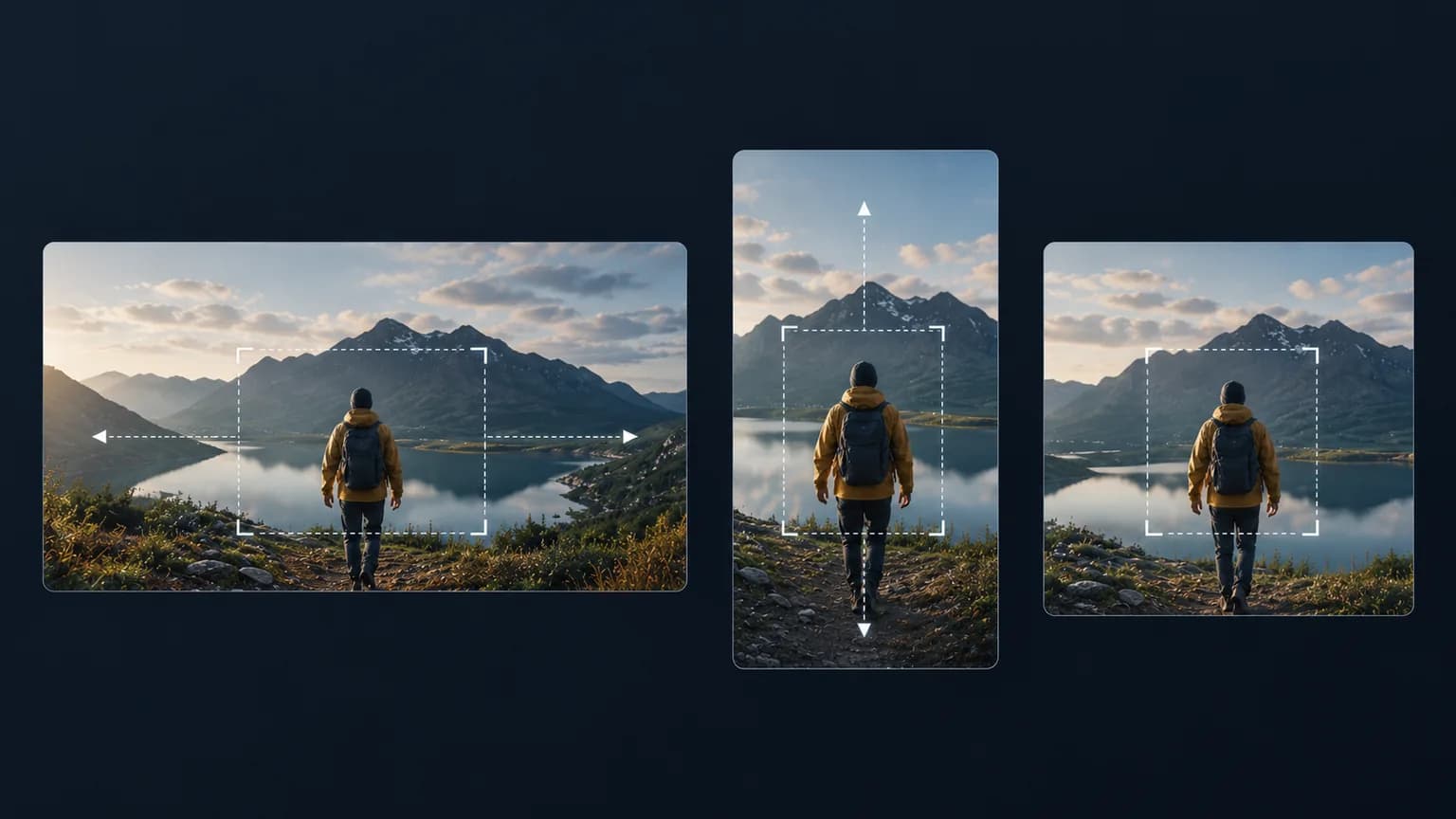
AI reframing tracks the primary subject across every frame, repositioning it as the aspect ratio changes. If a speaker moves left, the frame follows. If two people are on screen, the model decides which to feature based on motion and speech cues. The result is a vertical or square version that looks intentional instead of mechanically cropped.
The difference comes down to temporal consistency. A crop is static. A smart reframe adjusts dynamically, frame by frame, so the subject stays anchored throughout the cut instead of drifting to the edge whenever the camera moves. For teams publishing across multiple channels simultaneously, this turns what used to be a separate editing pass into a single step.
AI-Powered Captions, Translation, and Dubbing
Automated captions start with speech recognition: the AI transcribes audio, aligns words to timecodes, and drops them onto the timeline. Translated subtitles go one step further, running that transcript through a translation model and producing a second text track in the target language. Dubbing replaces the audio entirely, cloning or synthesizing a voice in the new language and rebuilding mouth movements to match.
The free floor rose sharply in February 2026, when YouTube opened automatic dubbing in 27 languages. Basic machine dubbing is now a default, not a paid feature, so any tool you pay for has to beat that baseline on voice fidelity, lip-sync quality, or editorial control.
Editorial control is where paid tools tend to separate themselves. A good caption workflow lets you fix a misheard product name before translation runs, so the error doesn’t propagate across every language after the fact. For dubbing, the meaningful controls are voice consistency across cuts and the ability to review each localized version before export.
Audio Cleanup and Automated Audio Balancing
Most video recorded outside a studio carries noise you didn’t notice while filming: HVAC hum, street noise, keyboard clicks, room echo. Manually cleaning that up in a traditional editor means layering noise reduction filters, adjusting thresholds by ear, and hoping the voice doesn’t get smeared in the process.
AI noise removal handles this differently. Instead of applying a blanket filter, it models what a clean voice should sound like and separates it from the background signal. The result is voice isolation that targets the problem precisely, without dulling the audio the way broadband noise reduction tends to.
Loudness normalization covers the other half. A multi-track timeline with interview clips, screen recordings, and music will almost always have mismatched levels. Automated audio balancing reads the loudness of every clip, applies gain adjustments relative to a consistent target level, and keeps the mix coherent without manual fader work.
Collaboration and Review Inside AI Video Editors
For most teams, the review cycle after an edit is slower than the edit itself. Someone exports a file, uploads it to a shared drive, a stakeholder watches it, writes feedback in Slack, someone else misreads the timestamp, and two rounds later the editor still isn’t sure which note was meant for which cut.
Browser-based collaboration shortens that loop. Instead of exporting anything, you share a link. Reviewers watch the current version, leave comments pinned to exact timecodes, and the editor sees feedback in context, right on the timeline. No version confusion, no “which file did you watch” back-and-forth.
For growth and marketing teams spread across time zones, the async angle matters as much as the real-time one. A creative director in London can leave notes overnight; the editor in New York sees them in the morning, resolved before the next standup.
Categories of AI Video Tools and Which Use Cases They Fit
Not every AI video tool is doing the same job, and picking the wrong category is a common source of frustration.
| Category | What it does | Best fit |
|---|---|---|
| Agentic editors | Takes raw footage and produces a first cut from a prompt | Teams with large footage libraries who need a starting point fast |
| Clip repurposing tools | Extracts short-form clips from long-form video automatically | Podcasters, webinar teams, anyone recycling existing content |
| Avatar and text-to-video generators | Creates video from a script, no camera required | Training content, product explainers, localized video at scale |
| AI-enhanced desktop editors | Traditional timeline editors with AI features layered in | Editors who want familiar workflows with selective automation |
The distinction that trips people up most is agentic editors versus repurposing tools. Repurposing tools assume your long-form content is already good and clip the best parts. Agentic editors start from raw, unstructured footage and make structural decisions. If your raw footage is messy, a repurposing tool will surface messy clips. You need an editor that can make sense of the material before extracting from it.
What to Look For When Choosing an AI Video Editor
A few questions worth asking before you commit to any tool.
Output Quality and Control
The most important variable is how much editing judgment the AI actually has. Can it make structural decisions from raw footage, or does it mostly clip and trim what’s already clean? Test it with genuinely messy material: long takes, multiple speakers, variable audio. A tool that looks good on a polished demo reel might fall apart when your footage is imperfect.
Export and Resolution
Check the ceiling before you sign up. Some tools cap exports at 1080p or add watermarks on lower tiers. If you’re shipping to clients or publishing at 4K, those limits matter.
Collaboration
Browser-based tools let reviewers leave timecoded notes without installing anything. Desktop tools typically require you to export a review file and manage feedback separately. For distributed teams, the workflow difference is real.
Captions and Localization Depth
Automated captions are table stakes now. What separates tools is whether you can edit the transcript before translation runs and whether dubbing preserves voice consistency across cuts. See how Cardboard’s plans handle captions and translation by tier.
Where AI Editors Still Fall Short
Current AI tools produce good first drafts, not finished films, and there are still hard problems in AI video editing worth understanding. Color grading, complex motion graphics, and precise pacing decisions still require a trained editor. If you need that level of craft, look for tools that export to Premiere Pro or DaVinci Resolve so you can finish in a professional timeline.
How Cardboard Approaches AI-Powered Video Editing
Cardboard AI (cardboard.ai) is an AI video editor built around a simple idea: describe the edit you want, and the tool proposes a first cut on the timeline. No install, no plugins, no server-side processing. Everything runs client-side using a custom hardware-accelerated renderer on WebCodecs and WebGL2.
The features map directly to what the rest of this post covers:
- Natural language editing lets you type “make a 60-second recap from this raw footage” or “cut this into a 20-second ad” and get a draft back fast.
- Semantic footage search finds quotes, reactions, and scenes across hours of material by meaning, not filename.
- Smart Reframe turns one video into vertical, square, and widescreen versions automatically, tracking the subject frame by frame.
- AI captions include a Word Pop style that reveals words as they’re spoken and surfaces keywords on their own line, built for social-native formats.
- Caption translation is built in (Starter and up).
Collaboration works through shared links. Reviewers leave timestamped comments without an account, and editors see feedback in context on the timeline. Public share links always show the latest published cut, so there’s no version confusion.
For teams who need to finish in a professional editor, Cardboard exports to Premiere Pro and DaVinci Resolve (Starter and above), with 4K output on Creator and Pro. Cardboard pricing starts at $8/month on Lite (as of October 2026), with a $5 first month.
Final Thoughts on AI-Powered Video Editing Tools
Good video content takes time, and AI editing tools are genuinely cutting that time down without cutting corners on quality. Your footage becomes searchable, your formats multiply automatically, and your review cycles get shorter. Cardboard is built around exactly that workflow if you want to see it in action.
FAQ
What is the best AI video editor for marketing teams who need to ship videos fast?
For marketing teams focused on speed from raw footage to finished cut, agentic editors like Cardboard outperform repurposing tools like Descript because they make structural decisions on unstructured material instead of simply clipping what’s already clean. The key factors to compare are whether the tool accepts genuinely messy raw footage, whether collaboration happens inside the browser without exports, and whether you can get a 4K deliverable without hitting a resolution paywall.
How does semantic video search work, and which editors support it?
Semantic video search reads visual signals, speech content, and emotional cues together to return results by meaning, so you can find “the moment she explains pricing” across two hours of footage without manual tagging or scrubbing. Most traditional editors rely on transcript keyword matching, which only works if the speaker used the exact word you searched. Cardboard’s semantic footage search is one of the few implementations built directly into the editing timeline and not bolted on as a separate tool.
What is the easiest way to add translated captions and AI dubbing to a video?
The fastest path is an editor that runs translation directly off the source transcript before you export, so you can fix a misheard product name once and have the correction carry through every language. Since YouTube opened automatic dubbing to all creators in 27 languages in early 2026, free machine dubbing is the new baseline, meaning any paid tool needs to beat it on voice consistency, editorial control, or lip-sync quality to earn its price.
Can I use natural language to edit videos by describing the cut I want, without manually dragging clips?
Yes. Agentic editors like Cardboard accept plain-language instructions such as “remove all filler words and beat-sync to the music track” or “start with the strongest quote and cut to 90 seconds” and return a proposed cut on the timeline in seconds. The more concrete your instruction, the more useful the draft. Highly specific requests tend to produce better results than open-ended tonal ones like “make this feel more cinematic.”
Cardboard vs Descript for teams working from raw multi-scene footage?
Descript works best when your long-form content is already edited and you want to repurpose clips from it. Cardboard is built for teams starting from raw, unstructured footage who need a structural first cut fast, with semantic search, Smart Reframe, and review links with timecoded comments built in. If your workflow ends in Premiere Pro or DaVinci Resolve, Cardboard also exports XML directly to both.