What Is MCP? Video Creator Basics, 2026
Get a clear, plain-language definition of MCP and how video creators use it to edit clips through chat, as of November 2026.
 Cardboard Team7 min read
Contents7 sections
MCP (Model Context Protocol) connects compatible AI assistants to outside apps and data. For video editing, it lets your assistant pass requests, such as adding captions to an interview, to an editing app. You don’t need to build that connection yourself to understand its tools, permissions, and when to return to the timeline.
TLDR:
- MCP (Model Context Protocol) is an open standard connecting AI assistants to apps and data.
- Check that your chat assistant and video editor both support the MCP connection.
- MCP tools can remove filler words or add interview captions, depending on the server.
- Check what each connected app receives before sharing your private interview footage.
- Cardboard AI (cardboard.ai) lets you request video edits in ChatGPT or Claude.
What is MCP?
MCP stands for Model Context Protocol. It is an open standard for connecting AI assistants to outside apps and data.
Compatible assistants and apps use a shared way to communicate, so developers don’t need a separate connection for every pairing.
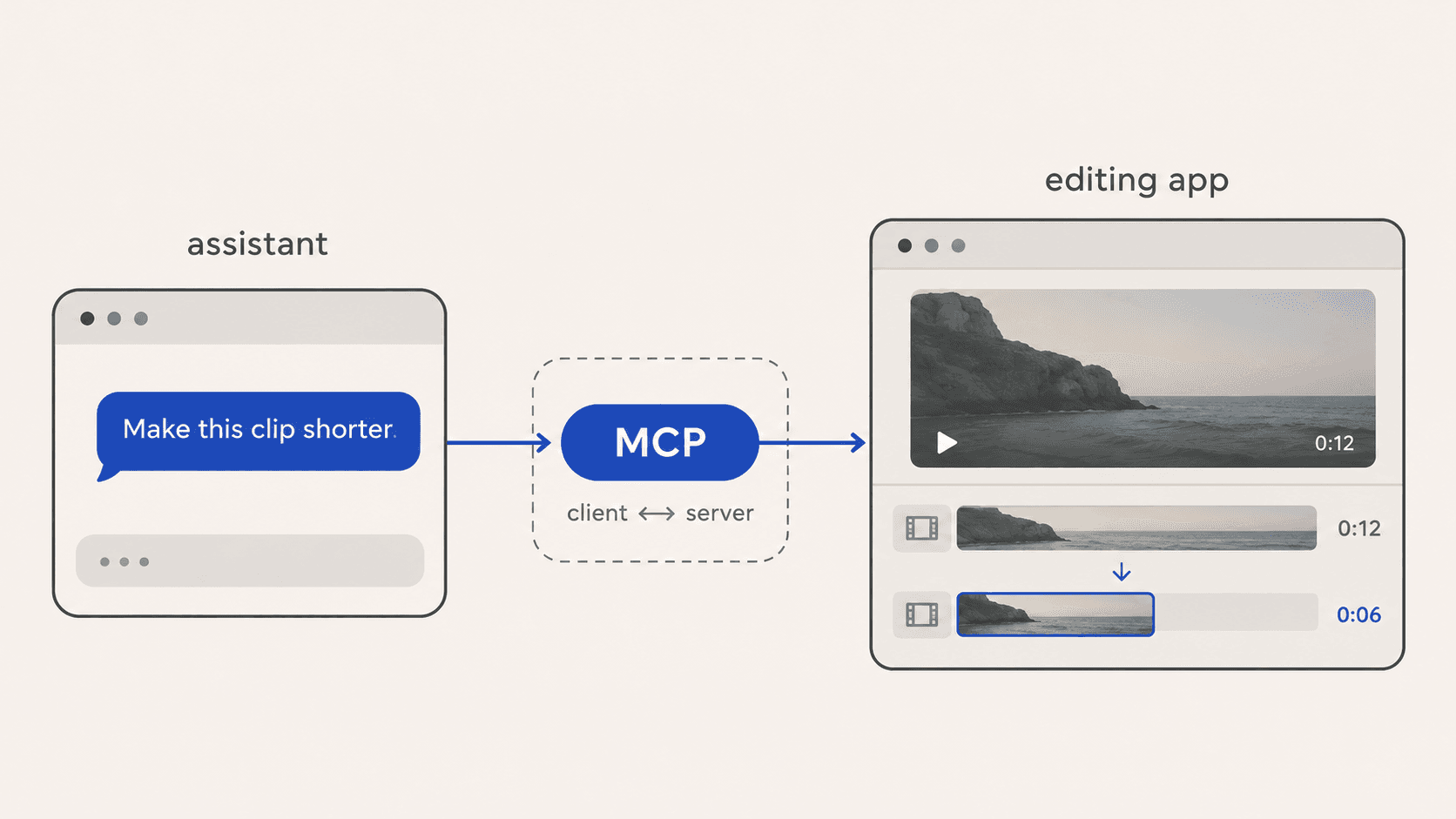
For video creators, that could mean attaching a podcast clip in a compatible chat and asking, “Make this clip shorter.” The assistant would send the editing request to the app through its MCP server. The assistant and editing app both need to support that connection, since video editing involves hard problems that most connections aren’t built to handle.
How Does MCP Work?
MCP connects your AI app to an outside tool through a client and server. For video work, that connection lets
an assistant send editing requests to an editor.
What are the host, client and server?
The MCP architecture has three parts: the host app, its connection client, and the server providing tools. Here is the route your editing request takes:
- The host is the AI app where you make a request, such as “Make this interview shorter.”
- The client manages the host’s connection to a particular server.
- The server provides access to the outside app’s tools and data, such as a video project and editing actions.
What can an MCP server offer an LLM?
An MCP server can offer tools, resources, and prompts. What you can use depends on what that server makes available:
- Tools perform actions, such as removing filler words or adding captions to your interview.
- Resources provide context data, such as an uploaded interview file.
- Prompts are user-selected templates, often shown as slash commands. A saved set of instructions for editing interviews could be one example. Before a server can act, you’ll typically walk through sign-in and permissions.
What MCP Terms Should Video Creators Know?
MCP terms describe how your chat app connects to an outside app and requests actions. Use this glossary when setting up a connection for video editing.
| Term | Plain meaning | Video example |
|---|---|---|
| MCP | An open standard for connecting an LLM to outside apps | Lets Claude use a video editor’s tools |
| MCP server | The outside app’s side of the connection | An editor’s connector that gives access to your timeline |
| Host | The app where you chat with the AI | ChatGPT or Claude |
| Tool call | An action the LLM asks the server to run | A request to remove pauses from an interview |
| Connector or plugin | A menu label you may encounter for an MCP server connection | The connection you use when typing @Cardboard in ChatGPT to edit with Cardboard |
Anthropic developed MCP and introduced it on November 25, 2024.
How Is MCP Used to Edit Video in ChatGPT and Claude?
MCP connects chat assistants to editing tools. Cardboard’s MCP connector lets you attach footage and request edits in ChatGPT or Claude.
How do you connect Cardboard in ChatGPT?
Connect Cardboard through ChatGPT’s Plugin directory, then sign in with your Cardboard account. As of November 2026, every Cardboard plan qualifies, but early access may exclude some accounts.
- Open the Plugin directory.
- Search for Cardboard.
- Select Install plugin, then Connect, and sign in.
- Type @Cardboard in chat.
Once you connect Cardboard’s video editor in ChatGPT, attach interview footage and ask, “Remove pauses but keep every complete answer.”
Contact support@cardboard.ai.
What can you ask for in a chat?
In a Cardboard chat, you can request podcast clips, a product demo, or a captioned ad. Attach footage, then ask:
- Podcast clips: “Make three vertical clips, each with one complete idea.”
- Product demo: “Cut this screen recording into a 60s demo with captions.”
- UGC edit: “Cut this phone footage into a 20s captioned ad.”
Cardboard chat editing details, as of November 2026:
- Exports default to 1080p MP4; Creator and Pro support 4K, as shown on Cardboard’s pricing page.
- Cloud compute costs about 3 credits/hour awake; it sleeps after 5 idle minutes.
Cardboard sees tool calls, not your conversation.
When is chat editing not the best fit?
Chat editing is not the best fit when you need to adjust individual cuts on a timeline. For an interview, use Cardboard’s web editor or Mac app to refine where an answer starts and ends. If you have no footage and want a presenter-led video from a script, use an avatar tool instead of Cardboard.
| Workspace | Requirements | Best for |
|---|---|---|
| Chat | Any Cardboard plan, early access (as of November 2026) | Quick edits |
| Web | Desktop browser | Timeline refinement |
| Mac | Apple Silicon; Lite free in the Mac app (as of November 2026) | Heavy footage |
| Mac with own agent | Paid Claude or ChatGPT plan (as of November 2026) | Claude Code or Codex editing |
If you’re setting up chat editing for the first time, walk through your first video before moving on to longer projects.
Why does MCP matter for video creation?
MCP lets you request video edits through chat while keeping creative decisions in your hands.
- For a talking-head video, describe which take to keep in the chat you already use. You can start without learning timeline controls.
- MCP provides a shared standard for connections across apps. The Cardboard connector lets you work on vlog footage through ChatGPT or Claude.
- Your cut stays editable. Ask Cardboard to “Cut this product footage into a 20-second ad,” then reopen the project to adjust a shot’s timing on the timeline.
- For a travel vlog, you can request captions and export through the same connection. That reduces intermediate downloads and re-uploads.
- Check data access before connecting private interview footage. The connector receives the assistant’s tool calls, while uploaded footage is stored under your Cardboard account. Check what each connected app receives, too.
Frequently Asked Questions About MCP Video Editing
What is MCP and why does it matter for video editing?
MCP (Model Context Protocol) is an open standard that connects AI assistants like ChatGPT and Claude to outside apps and data. For video editing, it means you can attach interview footage in a chat, type a request like “Remove pauses but keep every complete answer,” and a connected editor handles the actual cut, without you switching apps or rebuilding the connection yourself.
Can I edit video in ChatGPT or Claude without running my own MCP server?
Yes, Cardboard provides the hosted MCP connection, so you can edit without running your own server. As of November 2026, every Cardboard plan qualifies, though early access may exclude some accounts. Once connected, attach interview footage and ask, “Remove pauses but keep every complete answer.”
Cardboard MCP in ChatGPT vs Cardboard web editor: which should I use?
Use Cardboard’s ChatGPT or Claude connector for quick requests like “Cut this interview into a 30-second clip with captions.” Use Cardboard’s web editor or Mac app when you need to adjust individual cuts, trim where an answer starts, or refine the timeline by hand. Your chat edits are saved under your Cardboard account.
How do I connect Cardboard to ChatGPT for the first time?
Open the Plugin directory in ChatGPT, search for Cardboard, select Install plugin, then Connect and sign in with your Cardboard account. Once connected, type @Cardboard, attach interview footage, and ask, “Remove pauses but keep every complete answer.” If the plugin shows as unavailable, contact support@cardboard.ai.
Does connecting Cardboard through MCP give ChatGPT access to my other apps?
No, connecting Cardboard gives ChatGPT access to Cardboard’s tools only. Each outside app needs its own supported connection and permissions. Before uploading private interview footage, check what each connected app can receive: Cardboard sees the tool calls the assistant makes, not your conversation, and stores uploaded files under your Cardboard account.
How can you put MCP video editing into practice?
MCP is the connection between your assistant and compatible apps, not the editor itself. You bring the footage and decide what matters. Try Cardboard with interview footage and ask, “Remove pauses but keep every complete answer.”