Cardboard AI Video Editing Software: What's New? (2026)
What changed in Cardboard this November 2026: Premiere Pro import, 3D graphics, voice isolation and faster timeline exports.
 Cardboard Team11 min read
Contents17 sections
- What Does AI Video Editing Software Actually Do?
- How Do You Choose AI Video Editing Software for Your Footage?
- What Changed in Cardboard From September to November 2026?
- Is There a Free AI Video Editor for Mac?
- Can You Edit Video With Your Own Claude Code or Codex?
- Can You Open Premiere Pro Projects in an AI Video Editor?
- Can You Edit Videos Inside ChatGPT and Claude?
- How Do Recipes Turn Your Own Clips Into a Ready-Made Format?
- How Do You Isolate Voice and Remove Background Music From Video?
- Can an AI Video Editor Generate 3D Graphics?
- What Workflow Fixes Shipped for Footage, Exports, Scrubbing and Text?
- Is AI Video Editing Software a Cheaper Alternative to Hiring an Editor?
- Which Cardboard Plan Do These Updates Need?
- What Are Common Questions About AI Video Editing Software?
- What's the best free AI video editing software for Mac in 2026?
- Should I use Cardboard or Premiere Pro for a first cut from raw interview footage?
- Can I use AI video editing software inside ChatGPT without a separate download?
- How do I open a Premiere Pro project in an AI video editor?
- Can free AI video editing software remove background music from footage without a watermark?
- FAQ
- How Can You Try AI Editing on Your Own Footage?
- What Else Should You Know About Editing With Cardboard?
Cardboard AI (cardboard.ai) offers local AI video editing software on Apple Silicon Macs, without uploading your footage first. As of November 2026, Lite is free in the Mac app and includes only three watermarked 1080p exports. See which recent updates fit your projects, from Premiere Pro import to faster exports.
TLDR:
- Cardboard’s Mac app edits your footage locally on Apple Silicon, with no upload needed.
- The Cardboard connector lets you request edits inside ChatGPT and Claude, subject to early-access availability.
- Recipes turn your clips into ready-made formats on an editable timeline.
- Cardboard now opens Premiere Pro .prproj files directly in its Mac app.
What Does AI Video Editing Software Actually Do?
AI video editing software uses requests or templates to guide cuts, captions, reframing, B-roll, audio cleanup and pacing.
It covers three jobs:
- Editing your existing footage.
- Clipping moments from finished videos.
- Generating video from scripts or prompts.
Example request: “Turn this 45-minute podcast into three captioned, 30-second vertical clips.”
Wyzowl’s survey reports 63% of video marketers used AI for creation or editing, up from 51%. Separately, it reports that 91% of businesses use video marketing.
How Do You Choose AI Video Editing Software for Your Footage?
Choose AI video editing software around your footage, computer and export needs. Check browser and Mac support.
- Do free exports have watermarks or limits?
- Is signup required?
- Can you rework interview cuts in an editable timeline?
- Can you export for social, Premiere Pro or DaVinci Resolve?
For scripts, choose script-to-video tools; for bulk clipping, consider dedicated clippers.
For an interview, try the same request in each editor: “Remove the pauses and filler words, then add captions.” Check the cuts, captions and export before choosing.
What Changed in Cardboard From September to November 2026?
Cardboard added a Mac app, recipes, chat-based editing and Premiere Pro import from September through November 2026.
| Date | Updates | For |
|---|---|---|
| September | Canvas text, scrubbing, exports; Mac app and external agents (Sep 28) | Titles, interviews, delivery, Apple Silicon, Codex/Claude Code |
| October | ProRes, recipes, faster exports, ChatGPT/Claude editing; 3D (Oct 5) | Footage, formats, revisions, chat, visuals |
| November 2 | Mac 1.5: Premiere Pro import, audio, playback, voice isolation | Existing projects, speech |
For product footage, try: “Add a spinning 3D product shot.” Browse the full Cardboard release notes.
Is There a Free AI Video Editor for Mac?
Yes, as of November 2026, Cardboard for Mac includes free Lite on Apple Silicon (M1 or later). No card is needed; Lite includes 3 total 1080p exports with a small watermark. The Mac app launched September 28.
Footage stays local, with no upload needed. For a 2-hour event shoot, ask:
“Make a 60s recap from this raw footage.”
Use the web editor on Intel Macs or Windows. There’s no Windows desktop app or phone app.
Can You Edit Video With Your Own Claude Code or Codex?
Yes, as of November 2026, Cardboard’s Mac app lets you connect Claude Code or Codex with a paid Claude or ChatGPT plan. Added September 28, this option is in Settings, then Agents. Select your coding agent instead of the built-in Director.
Your agent gets access to footage, the timeline and editing tools. For a 20-minute screen recording, ask: “Remove pauses and filler words, then add captions.”
This differs from the hosted ChatGPT and Claude connector. Codex cannot use that plugin.
Can You Open Premiere Pro Projects in an AI Video Editor?
Yes, Cardboard lets you open Premiere Pro .prproj files directly in its Mac app, a feature added November 2. As of November 2026, exporting the timeline back to Premiere Pro requires Starter or above and uses XML in the web editor, not the Mac app.
Open your half-finished client project and type “Cut this into a 20s ad,” then return to Premiere Pro for color work.
As of November 2026, timeline export requires Starter or above and the web editor: XML for Premiere Pro, FCPXML for DaVinci Resolve. If your client requires a Premiere Pro project for delivery, keep the final handoff there. See this Premiere Pro vs Cardboard comparison for help choosing your workflow.
Can You Edit Videos Inside ChatGPT and Claude?
Yes, Cardboard lets you edit videos inside ChatGPT and Claude; early access may limit account availability. The connector launched October 26. Attach clips and request an edit.
In ChatGPT:
- Open the Plugin directory.
- Search for Cardboard.
- Select Install plugin.
- Select Connect and sign in.
- Type @Cardboard in chat.
Try: “Make three vertical clips from this podcast, each with one complete idea.”
As of November 2026, exports default to 1080p MP4; Creator and Pro support 4K.
How Do Recipes Turn Your Own Clips Into a Ready-Made Format?
Cardboard recipes give your clips ready-made editing formats, including Reels. Added October 13, recipes let the Director build your version on a multi-layer timeline.
Search by description on web or Mac, such as Travel Diary or Editorial Interview. Mix video, photos and audio, then share through a Remix link.
Choose the screen product demo format, add a product walkthrough screen recording and two product photos, then ask: “Cut this into a 20s ad.”
How Do You Isolate Voice and Remove Background Music From Video?
To remove background music from a cafe vlog, use Cardboard’s one-click voice isolator in the Mac app. Added November 2, it separates vocal and instrumental tracks while keeping speech. Voice isolation is Mac-only.
Try: “Remove the background music from this 3-minute street interview and keep only the voice.”
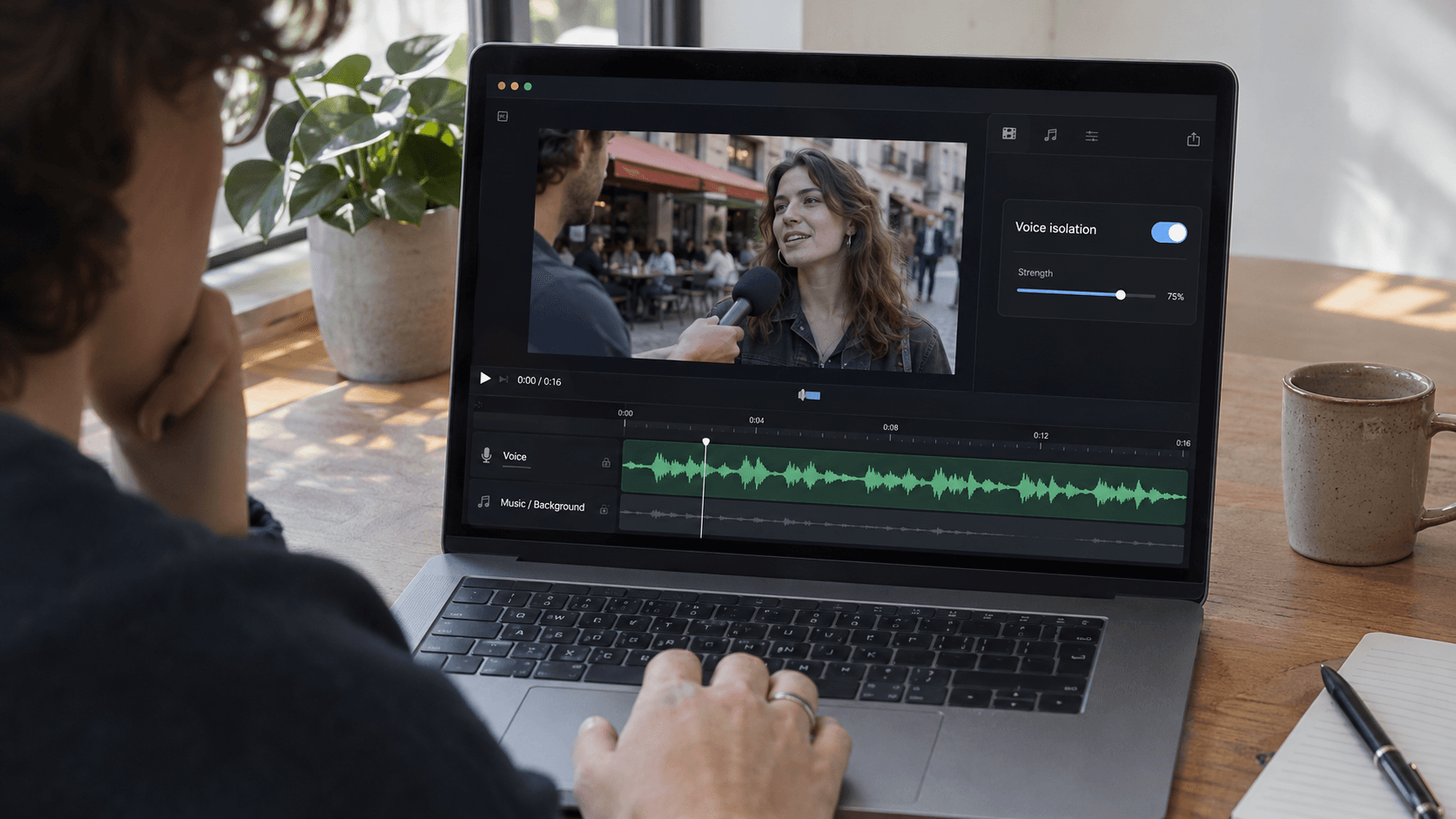
The November 2 release notes also mention cleaner audio. Cardboard’s music ducking lowers a separate soundtrack under speech, for example, beneath an interview in an event recap.
Can an AI Video Editor Generate 3D Graphics?
Yes, Cardboard’s Director generates 3D graphics and effects, including flight-down camera moves, a feature added October 5. You can ask for a spinning product shot for a launch ad.
For a 15-second teaser, ask: “Open with a spinning 3D shot of the product, then cut to the screen recording.”
Photo-to-video generation is a separate feature: as of November 2026, it uses generative credits on Starter and above; Lite has none. Editing your own footage remains Cardboard’s core use, whether in the Mac app or through the ChatGPT and Claude connector.
What Workflow Fixes Shipped for Footage, Exports, Scrubbing and Text?
Cardboard’s workflow fixes cover footage, timeline editing and exports:
How Do You Edit Text Directly on Your Video?
Cardboard’s September 7 update lets you edit text directly on the canvas. For a 30-second interview clip, ask: “Add the speaker’s name at the start.” Select the text to adjust its font, weight, color or shadow.
How Do You Review a Long Interview Timeline?
Cardboard’s September 14 update makes scrubbing long timelines faster. Drag the playhead through a 1-hour interview to review takes, then ask: “Remove the pauses and filler words, then add captions.”
What Changed for Video Exports?
Cardboard’s September 21 and October 20 updates made exports more reliable, then faster. For event footage, ask: “Make a 60s recap from this raw footage.” Review the cut, then export a 1080p MP4.
Can You Edit ProRes Footage and Dolby Audio?
Yes, Cardboard’s October 5 update supports ProRes imports, previews and exports, plus Dolby AC-3 and E-AC-3 playback with waveforms. Import a ProRes interview and ask: “Remove the pauses and filler words, then add captions.” If a file is unreadable, follow Cardboard’s conversion guidance.
For a 1-hour ProRes interview, scrub through your footage, trim the takes, then export a 1080p MP4.
Is AI Video Editing Software a Cheaper Alternative to Hiring an Editor?
AI video editing software can lower first-cut costs, but include your time and paid finishing work. For a 60-second launch cut, compare an editor’s quote with your labor and subscription costs. Cardboard Starter costs $9 for the first month, then $29/month (as of November 2026).
If you make only this video that month, assign it the full subscription cost. Add your labor and finishing costs, then compare that total with the editor’s quote for the same deliverable and revisions.
For a 30-minute walkthrough, ask: “Make a 60-second launch cut,” then hand the timeline to a contractor for polish. Keep a human editor involved for story-heavy films. Start by comparing both workflows on one project, or check this roundup of AI video editors for other options.
Which Cardboard Plan Do These Updates Need?
Cardboard plan requirements depend on your output, as of November 2026.
| Plan | Included |
|---|---|
| Lite | Core editing; free in the Mac app |
| Starter | Web timeline export, translation, AI music |
| Creator | 4K export, voice cloning |
| Pro | 10 GB files |
For lesson footage, ask: “Translate these captions into Spanish.” As of November 2026, you need Starter or above; see Cardboard pricing for plan details.
As of November 2026, recipes and the ChatGPT/Claude connector work across Cardboard plans; early access may limit connector availability.
See plan details and release notes, then open the web editor.
What Are Common Questions About AI Video Editing Software?
What’s the best free AI video editing software for Mac in 2026?
Cardboard’s Lite plan is free in the Apple Silicon Mac app (M1 or later), with no card needed (as of November 2026). It includes core editing and 3 watermarked 1080p exports total; watermark-free Starter costs $9 for the first month, then $29/month (as of November 2026). For an interview, ask: “Remove the pauses and filler words, then add captions.”
Should I use Cardboard or Premiere Pro for a first cut from raw interview footage?
It depends: use Cardboard for a request-based first cut, or stay in Premiere Pro when your client’s workflow requires it. For raw interview footage, ask Cardboard: “Remove the pauses and filler words, then add captions.” As of November 2026, exporting that timeline as XML for Premiere Pro requires Starter or above and the web editor.
Can I use AI video editing software inside ChatGPT without a separate download?
Yes, the Cardboard connector works in a ChatGPT or Claude web chat without a separate download, subject to early-access availability. Attach podcast footage and ask: “Make three vertical clips from this podcast, each with one complete idea.” If the plugin does not appear on your account, contact support@cardboard.ai.
How do I open a Premiere Pro project in an AI video editor?
Cardboard’s Mac app lets you open Premiere Pro .prproj files directly, a feature added November 2, 2026. Import a client interview project and type: “Cut this into a 20s ad.” As of November 2026, exporting the timeline back to Premiere Pro as XML requires Starter or above and the web editor.
Can free AI video editing software remove background music from footage without a watermark?
No, Cardboard’s Mac-only voice isolator separates vocal and instrumental tracks, but watermark-free exports require Starter or above (as of November 2026). Lite is free in the Mac app and includes 3 total watermarked 1080p exports (as of November 2026). For a cafe interview, ask: “Remove the background music and keep the voice.”
FAQ
What’s the best free AI video editing software for Mac in 2026?
Cardboard AI (cardboard.ai) is free in the Apple Silicon Mac app (M1 or later) on the Lite plan, with no card needed. Lite includes core editing and 3 watermarked 1080p exports total; watermark-free exports start on Starter, which costs $9 for the first month, then $29/month (as of November 2026).
Can I use Cardboard as a free AI video editor online free without watermark?
No, watermark-free exports require Starter or above (as of November 2026). The Lite plan is free in the Mac app and includes 3 watermarked 1080p exports total; on the web, Lite starts at $5 for the first month. Starter removes the watermark and unlocks unlimited exports at 1080p.
Cardboard vs Premiere Pro for a first cut from raw interview footage?
Use Cardboard when you want a request-based first cut fast, for example: “Remove the pauses and filler words, then add captions.” Stay in Premiere Pro when your client’s delivery workflow requires it; as of November 2026, exporting a Cardboard timeline back to Premiere Pro as XML requires Starter or above and the web editor.
How do I open a Premiere Pro project in an AI video editor?
Cardboard’s Mac app lets you open Premiere Pro .prproj files directly, a feature added November 2, 2026. Import your project, type a request like “Cut this into a 20s ad,” then return to Premiere Pro for color work; exporting the timeline back as XML requires Starter or above and the web editor (as of November 2026).
Can I edit video inside ChatGPT without downloading separate AI video editing software?
Yes, the Cardboard connector works in a ChatGPT or Claude web chat with no separate download, subject to early-access availability. Attach your footage, type @Cardboard, and ask for the edit; exports default to 1080p MP4, with 4K available on Creator and Pro (as of November 2026). If the plugin does not appear on your account, contact support@cardboard.ai.
How Can You Try AI Editing on Your Own Footage?
Try AI video editing software on product footage by asking Cardboard: “Cut this into a 20s ad.” Review the captions and rough cut, then keep detailed finishing in your usual editor.
What Else Should You Know About Editing With Cardboard?
Is Cardboard a practical AI video editor if you need nonprofit impact videos on a small budget?
Yes, Cardboard fits if you have interview clips, event footage or photos to edit yourself. As of November 2026, Lite is free in the Apple Silicon Mac app, with 3 total watermarked 1080p exports; watermark-free delivery requires Starter or above. Start with one interview and event clips, then ask: “Make a 60-second impact story ending with our donation request.”
How do you edit a two-person podcast with multiple camera angles in Cardboard?
Use Cardboard’s multicam sync to align camera recordings by their audio, then request cuts between speakers. For two cameras, ask: “Sync these podcast recordings by audio, cut to whoever is speaking, and keep the wide shot when both speakers talk.” Review speaker changes on the timeline before adding captions or making short clips.
Should you use Cardboard’s voice isolation or music ducking for an interview with background music?
Use Cardboard’s Mac-only voice isolation when unwanted music is already part of your interview recording; use ducking when you want timeline music to stay beneath speech. For a cafe interview, ask: “Remove the background music and keep the voice”; for a recap with a separate soundtrack, ask: “Lower the music while anyone speaks.” Try a 30-second sample in the Cardboard Mac app and listen before processing the full recording.