Opus Clip vs Cardboard Compared (October 2026)
A detailed October 2026 look at Cardboard vs OpusClip, covering pricing, collaboration, captions, and footage search capabilities.
 Cardboard TeamUpdated 8 min read
Contents10 sections
A lot of creators and marketing teams land on OpusClip first because it has great brand recognition, and for a specific use case it works well. But if your video process goes beyond pulling clips from a finished recording, you’ll want to know what each tool can and can’t do before you commit.
TLDR:
- OpusClip extracts clips from finished long-form video but has no timeline, search, or multi-format output
- OpusClip’s credit model charges per minute of source video, so high-volume teams face unpredictable costs
- Cardboard covers the full editing job: semantic footage search, multi-format reframe, captions, and 4K export
- Cardboard’s pricing starts at $8/month with unlimited exports at $29/month, not tied to source video length
- Cardboard is a browser-based agentic video editor used by teams at PostHog, Airtable, and Google
| Feature | OpusClip | Cardboard |
|---|---|---|
| Primary function | Clip extraction from finished long-form video | Full agentic video editing from raw footage to finished cut |
| Timeline / multi-track editing | No | Yes, multi-track timeline with keyframe animations |
| Footage search | Single file only | Semantic search across hours of raw footage |
| Reframing | Vertical (short-form) only | Vertical, square, and widescreen simultaneously |
| Captions | Auto-captions | Auto-captions, multilingual translation, AI dubbing, Word Pop |
| Team collaboration | Single-user, no co-editing | Real-time co-editing, timecode-based comments, public review links |
| Pricing model | 1 credit per minute of source video | Flat monthly plans ($8 to $175/mo), not tied to video length |
| Unlimited exports | Credit-dependent | From $29/month (Starter plan) |
| 4K export | Not available | From $59/month (Creator plan) |
| Browser-based | Yes | Yes (also native Mac app) |
What Is OpusClip?
OpusClip (at opus.pro) is an AI video repurposing tool built around one core job: take a long video and pull out short clips for TikTok, Reels, and YouTube Shorts. You upload a recording, and it automatically extracts clips optimized for vertical, short-form distribution.
Billing runs on a credit system that charges one credit per minute of source video, regardless of how many clips come out. Upload a 60-minute podcast and you’ll spend 60 credits, a cost worth weighing against turning a podcast into short clips with other workflows. The tool has built strong brand recognition with over 10 million users, and it tends to be the first stop for solo creators testing AI clipping.
Its sweet spot is individual creators or marketers who already have long-form content and want a faster path to social clips.
What Is Cardboard?
Cardboard is an agentic AI video editor that runs entirely in the browser, no installs required. There’s also a native Mac app if you prefer a dedicated window. You describe what you want in plain language, and Cardboard cuts, captions, reframes, and composes the video automatically.
The positioning is “Cursor, but for video.” Growth and marketing teams, agencies, and serious creators use it to ship polished videos at volume, without the slow manual workflows that come with traditional editing tools, a distinction worth understanding if you’re still asking what AI video editing tools actually do. Early users include teams from PostHog, Airtable, and Google.
Where OpusClip is focused on extracting clips from existing long-form content, Cardboard is built for the full editing job, from raw footage to finished video.
Editing Approach: Agentic vs. Automated Clipping
OpusClip’s workflow starts and ends with clip extraction. Give it a long video, it surfaces short segments worth posting. There’s no multi-track timeline, no keyframe animations, no way to compose something new from raw footage.
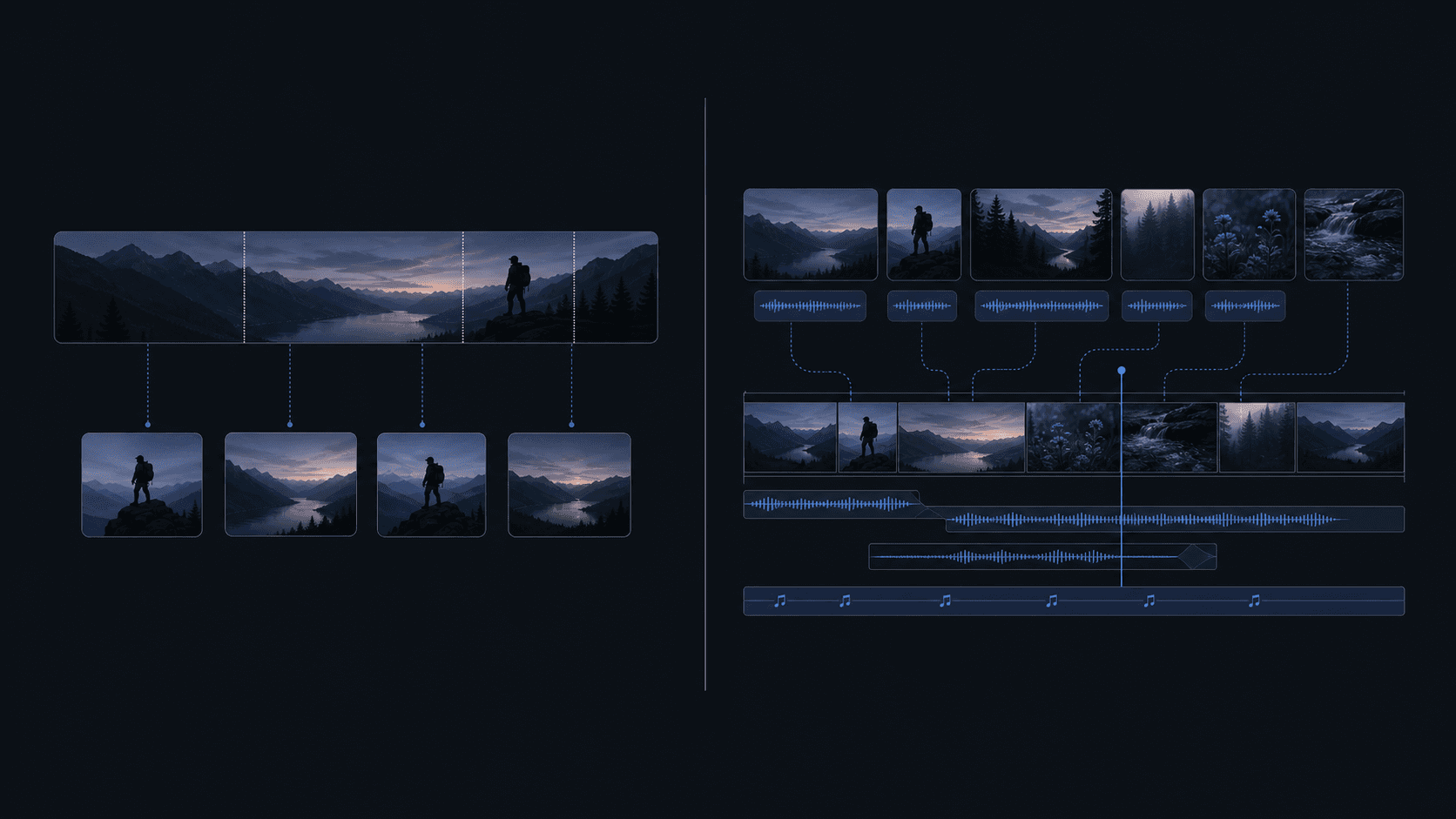
Cardboard works at a different level. Describe the edit in plain language and the Director agent proposes a first cut on a full timeline. From there, you get multi-track editing, keyframe animations, beat sync, shot detection, and XML exports for Premiere Pro, DaVinci Resolve, and Final Cut Pro if you need to hand off to another editor.
The gap matters if your work goes beyond repurposing, and it’s part of why teams comparing Descript alternatives often land here. OpusClip handles one specific task well. Cardboard handles the full job, from raw footage to a finished, export-ready cut.
Footage Search and Asset Management
OpusClip is built for a single video at a time. Upload one file, get clips out. There’s no way to search across a library for a specific reaction, quote, or moment buried in hours of footage.
Cardboard’s Semantic Footage Search lets you find people, emotions, reactions, and scenes across hours of raw footage without scrubbing through timelines manually. For teams managing multi-session shoot days, product walkthroughs, or batches of customer recordings, this cuts out a large chunk of the pre-edit grind.
If your library is one video, OpusClip’s approach is fine. If you’re regularly pulling from large asset collections, the difference in time spent just finding the right clip is hard to ignore.
Captions, Reframing, and Social-Ready Output
Both tools handle captions and reframing, but the scope differs noticeably.
OpusClip adds auto-captions and supports vertical reframing for short-form output. For a creator repurposing one video into clips, that covers the basics, though it’s worth comparing against other social media video editors before settling on one.
Cardboard’s Smart Reframe converts a single video into vertical, square, and widescreen versions at the same time, keeping the key action in frame across every format. Caption options go further: multilingual translation, AI voiceover dubbing, and Word Pop, a caption style that reveals words as they’re spoken and bumps keywords to a larger size on their own line, built for high-retention social formats. All caption presets also suppress display during extended silences automatically.
For teams running multi-format or multilingual distribution, that depth matters, which is a key factor when weighing the best AI video editors available right now. Repurposing one video for three aspect ratios and four languages in OpusClip means a lot of manual passes. In Cardboard, it’s one project.
Team Collaboration and Workflow
OpusClip is built for a single user working through a single video. There’s no real-time co-editing, no timecode-based commenting, and no structured way to run a creative review with stakeholders across a team.

Cardboard takes the opposite approach. Multiple editors can work on a project simultaneously, with comments anchored to specific timecodes so feedback stays tied to the exact moment it references. Sharing with stakeholders happens through a public link with no account required. Viewers can leave timestamped comments, and comment owners can resolve or delete pinned notes to keep review cycles from piling up.
For agencies or marketing teams managing approvals across multiple people, including those building a podcast clip reel, that structure cuts down the back-and-forth that typically ends up scattered across Slack threads or mismatched export files.
Pricing and Value for Volume
OpusClip’s credit model, covered above, adds up fast for teams regularly processing hours of footage. Costs scale with source video length, not the number of clips you actually use.
Cardboard’s pricing runs across flat monthly plans (detailed in the table above, checked against Cardboard’s pricing page in October 2026), and plan prices do not change with source video length. Higher tiers add more usage, with Lite at standard usage, Starter at 2.5x, Creator at 10x, and Pro at 30x. For teams running consistent volume, that predictability matters.
Why Cardboard Is the Better Choice
OpusClip does one thing well. If you have a finished long-form video and need social clips fast, it gets the job done. For solo creators with that specific need, it’s a reasonable tool.
For growth teams, agencies, founders, creative directors, and serious creators, the workflow rarely stops at clipping. You’re searching through raw footage, building first cuts, reframing for multiple formats, dubbing into other languages, running stakeholder reviews, and exporting to multiple specs. OpusClip covers little of that beyond captions and vertical reframing. Cardboard covers all of it, from semantic search through 4K export, driven by plain-language instructions with no install required.
Teams currently paying freelancers or agencies to manage that full pipeline will find Cardboard faster, more predictable on cost, and collaborative in a way that async file-sharing workflows simply aren’t. If your video production goes beyond clipping, the comparison isn’t close.
Final Thoughts on AI Video Editing With OpusClip and Cardboard
Both tools solve real problems, just different ones. OpusClip is a solid fit for creators who want clips fast from a finished video. Founders, CMOs, marketers, creative directors, video editors, and teams with a bigger production scope, raw footage to sort through, and multiple formats to deliver will get a lot more out of Cardboard.
FAQ
Should I use Cardboard or OpusClip if my team produces videos across multiple formats and languages?
If your workflow goes beyond pulling clips from a finished recording, Cardboard is the stronger fit. It handles multi-format reframing, multilingual caption translation, and AI dubbing in a single project, where OpusClip would require separate manual passes for each output.
What is the core difference between how Cardboard and OpusClip handle footage?
OpusClip processes one video at a time and extracts short clips for social distribution. Cardboard works from raw, unedited footage using a full multi-track timeline, semantic footage search, and plain-language instructions to build a finished cut from scratch.
Who is OpusClip best for, and who gets more value from Cardboard?
OpusClip suits solo creators who have a finished long-form video and want social clips fast, with minimal setup. Cardboard is built for growth teams, agencies, and serious creators who need to search through raw footage, manage stakeholder reviews, and export polished videos at consistent volume.
How does Cardboard’s pricing compare to OpusClip’s credit model for teams processing high volumes of footage?
Cardboard’s flat monthly plans do not change with source video length, so cost stays more predictable for high-volume teams than OpusClip’s per-minute credit model. Higher plans simply add more usage, rather than charging based on how much footage you upload.
Can my team collaborate on edits and run stakeholder reviews inside Cardboard?
OpusClip has no real-time co-editing or timecode-based review tools. Cardboard lets multiple editors work simultaneously, with comments anchored to specific timecodes, and stakeholders can review and leave feedback through a public link with no account required.