AI YouTube Shorts Generator Guide for Creators, Oct 2026
Discover how an AI YouTube Shorts generator helps you batch content, hit retention thresholds, and grow your channel in 2026.
 Cardboard Team11 min read
Contents12 sections
- Why YouTube Shorts Should Be Your Channel Growth Priority
- How AI YouTube Shorts Generators Work
- How to Repurpose Long-Form Video Into Shorts Automatically
- What to Look for in an AI Shorts Generator
- How the YouTube Shorts Algorithm Works in 2026
- How to Write Prompts That Get Great AI-Generated Shorts
- Auto-Captions, Reframing, and Retention-Optimized Formatting
- How to Use AI Shorts to Grow Your Channel Without Burning Out
- Repurposing Shorts Back Into Your Broader Content Strategy
- How Cardboard Handles AI Shorts Creation for Teams and Creators
- Final Thoughts on Automating Your YouTube Shorts Workflow
- FAQ
If you’re not repurposing your long-form content into Shorts, you’re leaving a lot of reach on the table. A single hour-long video can realistically produce a full week of clips, and with the right AI YouTube Shorts generator, you’re spending minutes reviewing drafts instead of hours editing. This covers exactly how to set that up.
TLDR:
- YouTube Shorts averages over 200B daily views and often rewards new channels with organic reach, though distribution still depends on retention performance
- One hour-long video can produce 5-10 publishable Shorts using an AI generator with smart reframe and auto-captions
- Keep Shorts between 22-45 seconds; swipe-away rate above 30% kills distribution before your clip gets a real test
- Batch one long-form session into a week of Shorts, budget 5 minutes per clip, and clear your queue in under an hour
- Cardboard is a browser-based AI video editor with Smart Reframe, Semantic Footage Search, and Word Pop captions built for Shorts workflows
Why YouTube Shorts Should Be Your Channel Growth Priority
YouTube Shorts averages over 200 billion daily views and has crossed 2 billion monthly active users, putting it in the same conversation as the largest social surfaces on the internet.
The algorithm treats Shorts as a separate discovery engine from long-form. A small channel can reach a much larger audience on a single Short if retention holds, because subscriber count carries far less weight here than in search or browse. Newer channels have a real shot at compounding growth without years of buildup.
Creators and teams skipping Shorts are opting out of one of the few remaining organic reach channels that still rewards consistency over ad spend.
How AI YouTube Shorts Generators Work
Most AI Shorts generators follow a similar pipeline once you drop in a video file.
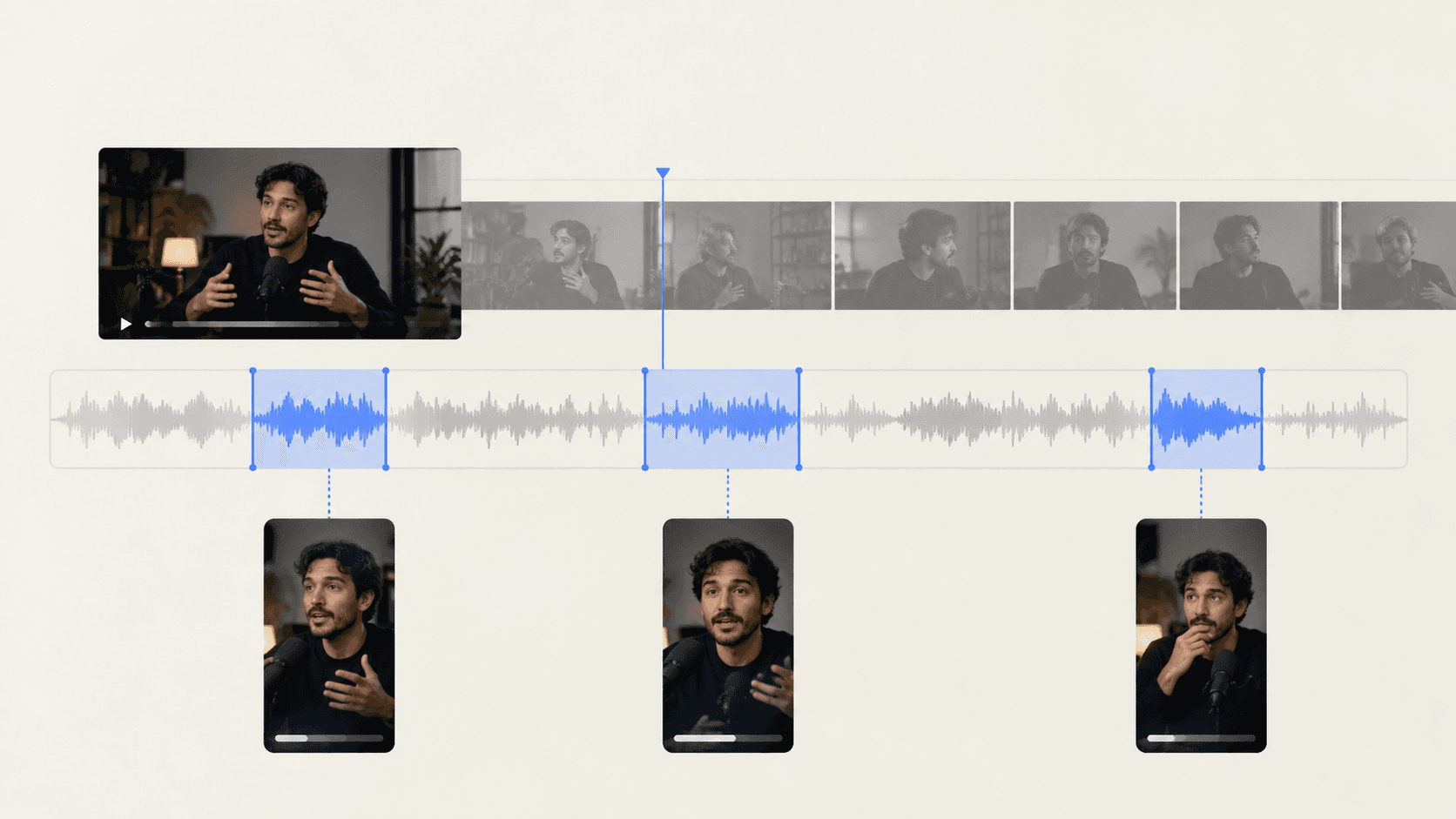
The tool transcribes the audio and builds a searchable transcript, then runs analysis across it to find moments with high signal: strong hooks, clear topic changes, emotional peaks, or punchy takeaways. Some tools layer in speaker detection so cuts happen at natural pause points instead of mid-sentence.
From there, candidate clips get scored. Most models weigh whether a moment can stand alone without context, how quickly it gets to the point, and whether the energy holds attention past the first few seconds. The tool then auto-reframes footage from widescreen to 9:16, keeps the active speaker in frame, and syncs captions. The output is a first-draft Short, ready to review.
One thing worth keeping in mind: these tools compress hours of review into seconds of processing, but the output reflects the quality of the source. Weak source material produces weak Shorts regardless of how good the AI is.
How to Repurpose Long-Form Video Into Shorts Automatically
A single hour-long podcast can realistically produce five to ten publishable Shorts. The challenge is finding those moments without scrubbing through the whole timeline manually.
The workflow is straightforward. Drop the source file into an AI Shorts tool, let it transcribe and analyze, then review the ranked clips it surfaces. Footage that works best tends to have a clear speaker, minimal crosstalk, and a payoff front-loaded early. Tutorials, interviews, and product walkthroughs are ideal because they naturally contain self-contained arguments or demos.
After the draft from one of the best AI video editors, expect to spend a few minutes per clip. You’re mostly trimming a second or two from the top, checking the reframe, and confirming captions are clean. For a weekly publishing schedule, batching works well: process one long-form video and pull three to five clips from it, giving you a consistent Shorts cadence without shooting new content every day.
What to Look for in an AI Shorts Generator
Picking the right tool comes down to a handful of capabilities that separate genuinely useful from frustrating.
- Moment detection accuracy: the AI should find clips that open strong, beyond segments with high word density. Test it on real footage before committing.
- Caption quality and styling: look for tools that sync captions word-by-word, suppress display during silences, and let you control font, size, and emphasis.
- Reframe intelligence: smart reframe should track the active speaker across cuts, instead of center-cropping a static frame.
- Export resolution: 4K 60fps matters if you want to repurpose the same clip across channels without quality loss.
- Collaboration support: if more than one person touches the video before it publishes, real-time commenting and shared timelines cut down on back-and-forth.
- Publishing integrations: direct scheduling cuts a step, but check whether the tool also exports clean files for manual upload if you prefer control.
One often-overlooked factor when comparing social media video editors is how the tool handles source files over an hour long. Some tools cap file size or throttle processing speed at scale, which becomes a real problem for teams running high-volume Shorts pipelines.
How the YouTube Shorts Algorithm Works in 2026
Since late 2025, the Shorts feed runs on a completely separate recommendation system from long-form YouTube. A Short’s performance no longer affects your long-form reach, and vice versa.
The dominant ranking signal is swipe-away rate. A swipe-through rate above roughly 30 percent stops a Short from being distributed further, meaning the algorithm decides within the first few seconds whether to keep showing your content.
Completion rate does most of the remaining work. 22 to 45 second Shorts outperform other lengths, with retention thresholds around 65 percent for clips under 30 seconds and 50 percent for clips between 30 and 60 seconds. Hitting those thresholds is what moves a Short from its initial test pool to broader distribution.
| Clip Length | Retention Threshold to Pass Test Pool | Notes |
|---|---|---|
| Under 30 seconds | ~65% completion rate | Higher retention threshold; hardest to exit early |
| 22 to 45 seconds | N/A | Sweet spot range; highest distribution potential |
| 30 to 60 seconds | ~50% completion rate | Still viable; harder to hold attention to the end |
| Any length | Swipe-away rate below 30% | Exceeding 30% swipe-away stops broader distribution entirely |
Your first two seconds need to earn the next twenty. AI generators can surface strong hooks from source footage, but you still need to confirm the clip opens with something that stops the scroll, a principle that carries over directly if you’re also building out a TikTok business account alongside Shorts.
How to Write Prompts That Get Great AI-Generated Shorts
Vague prompts like “make a Short from this video” give the AI too much latitude. Tight prompts with concrete parameters produce first drafts you can actually publish.
Specify these five things every time:
- Target length, such as “make a 30-second clip,” so the AI isn’t guessing at format
- Clip type, whether that’s a recap, ad cut, standout moment, or tutorial snippet
- Tone, like energetic, calm, authoritative, or conversational, to match your brand
- Subject focus, meaning the specific argument, demo, or moment you want centered
- Audience, so pacing and vocabulary land correctly for founders, marketers, or creative directors
In practice, that looks like: “Cut a 25-second clip of the product demo between minutes 8 and 12, front-load the result, keep the tone direct, aimed at founders.” This prompting style works across most transcript-driven tools, including several Descript alternatives. If the first draft misses, adjust one variable at a time. Changing length and tone simultaneously makes it hard to tell what actually fixed the output.
Auto-Captions, Reframing, and Retention-Optimized Formatting
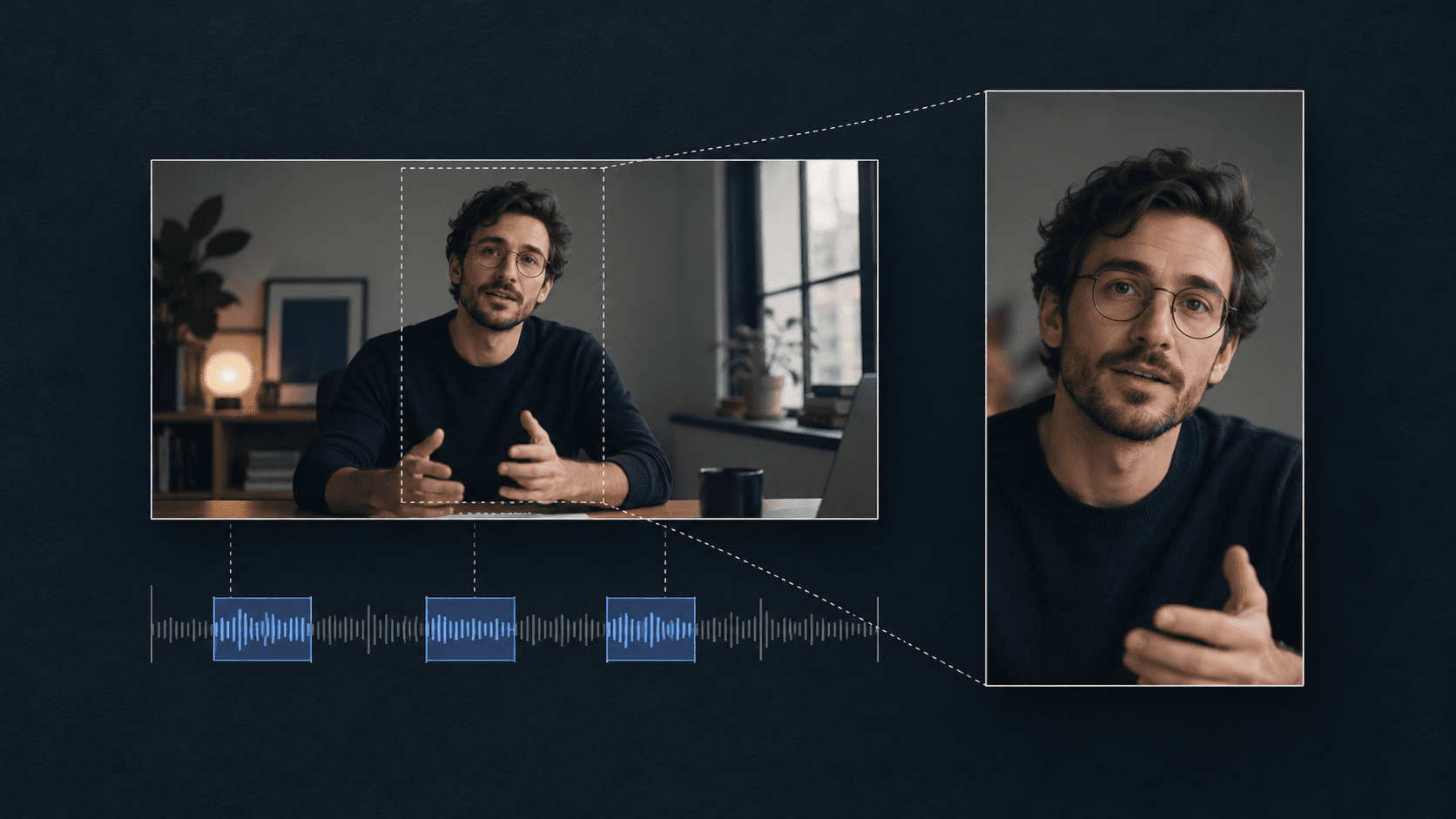
Captions on Shorts are a retention tool, not an accessibility checkbox. Viewers scroll with sound off, and a Short without readable captions loses those viewers in the first second.
Word-by-word caption reveal keeps eyes locked on the text as it appears, which indirectly extends watch time. Keyword emphasis, where certain words display larger or on their own line, gives the algorithm more completion signal to work with. Good AI tools, including several Runway AI alternatives, suppress captions during silences automatically, so the screen stays clean instead of showing a blank caption block sitting there.
Smart reframe handles the aspect ratio shift. A widescreen interview shot at 16:9 needs the speaker’s face centered in a 9:16 frame without cropping out whoever’s talking. Tools that track the active speaker across cuts do this better than static center-crop logic, especially when the camera moves or multiple speakers appear.
Together, these two features cut most of the post-processing work that buries teams. Without them, reframing and captioning a single clip manually can take longer than finding the clip in the first place.
How to Use AI Shorts to Grow Your Channel Without Burning Out
Batch processing separates creators who post consistently from those who post in bursts and disappear. Pull a week’s worth of clips from a single long-form session, then process, review, and queue them in one sitting. Daily friction drops to near zero.
Evergreen content is the best raw material for this. A tutorial or in-depth video that performed well six months ago still has usable moments. AI tools don’t care how old the source file is, and neither does a new subscriber finding your channel for the first time.
Human judgment still matters in the review pass. AI drafts get you most of the way there. The remaining work is catching a clip that starts a half-second too late or a reframe that drifted off the speaker’s face. Budget five minutes per clip and you can clear a week’s queue in under an hour.
The sustainable rhythm: one long recording session, one AI processing run, one review block, then schedule and walk away.
Repurposing Shorts Back Into Your Broader Content Strategy
A Short that performs well tells you something. High completion on a 30-second clip signals genuine audience interest, and that signal is worth acting on.
The most direct use is traffic flow. A Short can end with a soft pull toward a longer video on the same topic, which is especially effective when that longer video is a promo video for your business. Creators who do this consistently treat Shorts as top-of-funnel for their long-form library. The viewer already trusts the hook, so the transition to a 10-minute long-form video is a much shorter leap.
Top-performing Shorts also make strong candidates for paid amplification. If a clip already proved organic retention, boosting it removes guesswork from ad testing. The creative is validated; you’re buying more reach.
AI-generated virality scores and retention data from your Shorts feed back into future content decisions. Clips that consistently over-perform on a specific angle tell you where audience interest is strongest, which should shape what you record next.
How Cardboard Handles AI Shorts Creation for Teams and Creators
Cardboard is an agentic AI video editor that runs entirely in the browser, no installs required, though a dedicated AI video editor for Mac is also available. You describe the cut you want in plain language and it produces a first draft on the timeline.
For Shorts, a few features do the heavy lifting:
- Smart Reframe converts any footage into vertical, square, and widescreen versions automatically, keeping the active speaker in frame instead of static center-cropping.
- Semantic Footage Search lets you find specific quotes, moments, or reactions across hours of raw footage without scrubbing through a timeline manually.
- Word Pop captions reveal words as they’re spoken and surface keywords on their own line, built for exactly the kind of retention-optimized formatting Shorts rewards.
Real-time collaboration means a creator and editor can work in the same project simultaneously, leave timestamped comments, and share a public review link without requiring anyone to log in. Exports go up to 4K 60fps, with Premiere Pro and DaVinci XML support if your workflow extends beyond the browser. See pricing details for plans starting at $40/month with a 7-day free trial. Teams from PostHog, Airtable, and Google already use it to move from raw footage to finished video far faster than traditional editing allows.
Final Thoughts on Automating Your YouTube Shorts Workflow
Good Shorts come from good source material and a clear sense of what your audience actually responds to. AI gets you the first draft fast, and your judgment makes it publishable. If you want to see how this works in practice, Cardboard offers a 7-day free trial so you can test it on your own footage. Start with one long-form video and see how many clips come out the other side.
FAQ
How do I repurpose long-form video into YouTube Shorts automatically without scrubbing through footage manually?
Drop your source file into an AI Shorts tool and let it transcribe, score, and surface ranked clip candidates for you. The strongest sources are tutorials, interviews, and product walkthroughs because they naturally contain self-contained moments with clear payoffs. From there, budget roughly five minutes per clip for a review pass (trimming the top, checking the reframe, and confirming captions), then batch a full week’s queue in one sitting.
How do I use natural language to edit videos and describe the cuts I want in Cardboard?
Type your edit in plain language, something like “cut a 25-second clip of the product demo between minutes 8 and 12, front-load the result, keep the tone direct,” and Cardboard produces a first draft on the timeline. You refine from there instead of building from a blank sequence. Cardboard’s Semantic Footage Search also lets you find specific quotes, reactions, or moments across hours of raw footage without touching a timeline manually.
What are the most important features to look for in an AI YouTube Shorts generator?
Moment detection accuracy, smart reframe that tracks the active speaker across cuts, word-by-word captions with keyword emphasis, 4K 60fps export, and real-time collaboration for teams are the features that separate genuinely useful tools from frustrating ones. File size handling matters too: some tools cap processing at scale, which breaks high-volume Shorts pipelines. Test any tool on real footage before committing to it.
OpusClip vs Cardboard for automatically repurposing long-form video into Shorts?
OpusClip focuses on clip extraction and scoring from a single upload, which works for straightforward repurposing. Cardboard gives you the same AI-first clip surfacing through Semantic Footage Search, but layers in agentic editing via natural language, browser-based team collaboration, Word Pop captions built for retention, and 4K 60fps exports, making it a stronger fit for growth teams and creators who need to move from raw footage to a finished, publish-ready Short without switching between tools.
How does semantic video search work in AI video editors?
Semantic video search indexes your footage by meaning instead of timestamps or filenames alone, so you can search for “the moment she talks about churn” or “any reaction shot where someone looks surprised” and the editor surfaces matching clips. Cardboard uses semantic search across transcripts, speakers, emotions, and scenes, which makes it practical to pull the right moment out of a two-hour recording without manually scrubbing the timeline.