Marketer's Guide to AI Video Workflows (2026)
Build faster ad, social clip and recap workflows with AI. This 2026 guide covers lengths, templates and on brand checklists.
 Cardboard TeamUpdated 8 min read
Contents15 sections
- Why Does Video Editing for Marketers Matter?
- What Videos Should Marketers Edit
- How Do You Edit a Video Ad That Converts?
- How Do You Turn Long Footage Into Social Clips?
- How Do You Edit an Event or Product Launch Recap?
- How Can Marketers Edit Phone Footage and Product Shots?
- Which AI Editing Features Actually Save Marketers Time?
- How Do You Keep Marketing Videos On Brand Across a Team?
- What Is the Best Video Editing Software for Marketers?
- Are Free Video Editing Tools Enough for Marketers?
- Should Marketers Learn to Edit, Hire an Editor or Use AI?
- How Do You Know If Your Video Edits Are Working?
- How Does Cardboard Fit Into Your Marketing Video Workflow?
- FAQ
- How Can You Keep Your Marketing Videos Moving?
Video editing for marketers starts with matching your demo recordings, podcast footage and event clips to the job. Give ads one point and a clear CTA, social clips a complete idea, and recaps a simple story. Use AI to cut repetitive work and reusable templates to keep your captions, colors, and logos consistent across the team.
TLDR:
- Test three 20-second video ads with different hooks, one point and a readable CTA.
- Cut your 40-minute webinar into five standalone social clips lasting 30 to 60 seconds.
- Build a 60 to 90-second event recap from 10 to 20 strong shots.
- Use AI for captions and reframing. Check names, crops and context before you publish.
- Cardboard AI (cardboard.ai) edits your existing footage by chat or by hand.
Why Does Video Editing for Marketers Matter?
Video editing for marketers turns raw footage into publishable content and keeps your schedule on track, whether the footage is a launch teaser, a weekly demo clip or an event recap.
Wyzowl’s 2026 video statistics report that 91% of businesses use video, 82% of video marketers report good ROI (down from 93% the year before), and 63% have used AI for video creation or editing. Among businesses without video, 24% cite cost and 19% cite time.
For your next 45-minute customer interview, budget editing time alongside recording time so the footage reaches publication.
For example, say you record a customer interview on Monday for a Friday launch. Cut a first version on Tuesday, collect timestamped comments on Wednesday and export on Thursday. The 60-second teaser then goes live on launch day instead of the week after.
What Videos Should Marketers Edit: Ads, Social Clips or Recaps?
For video editing for marketers, choose ads for conversions, social clips for reach, and recaps for trust. Match your footage to the goal.
Use these lengths as planning guides, not upload rules.
| Format | Suggested length | Footage to cut | Funnel stage |
|---|---|---|---|
| Ad | 20 seconds | Product demo and buyer interview | Awareness or conversion |
| Social clip | 30 seconds | Podcast recording | Awareness |
| Event, launch or quarterly recap | 60 seconds | Phone footage and recorded updates | Consideration |
How Do You Edit a Video Ad That Converts?
For video ads, open with a hook, make one point, and show a readable CTA.
- Trim your strongest line to 15 or 30 seconds.
- Caption for sound-off viewing.
- Keep vertical text clear of edges and app buttons.
- Export vertical and horizontal versions.
Test three 20-second UGC testimonial cuts with different openings.
IAB’s 2026 report projects US digital video ad spend will pass $80 billion in 2026, up 11%, and take more than 60% of total TV/video ad spend for the first time.
How Do You Turn Long Footage Into Social Clips?
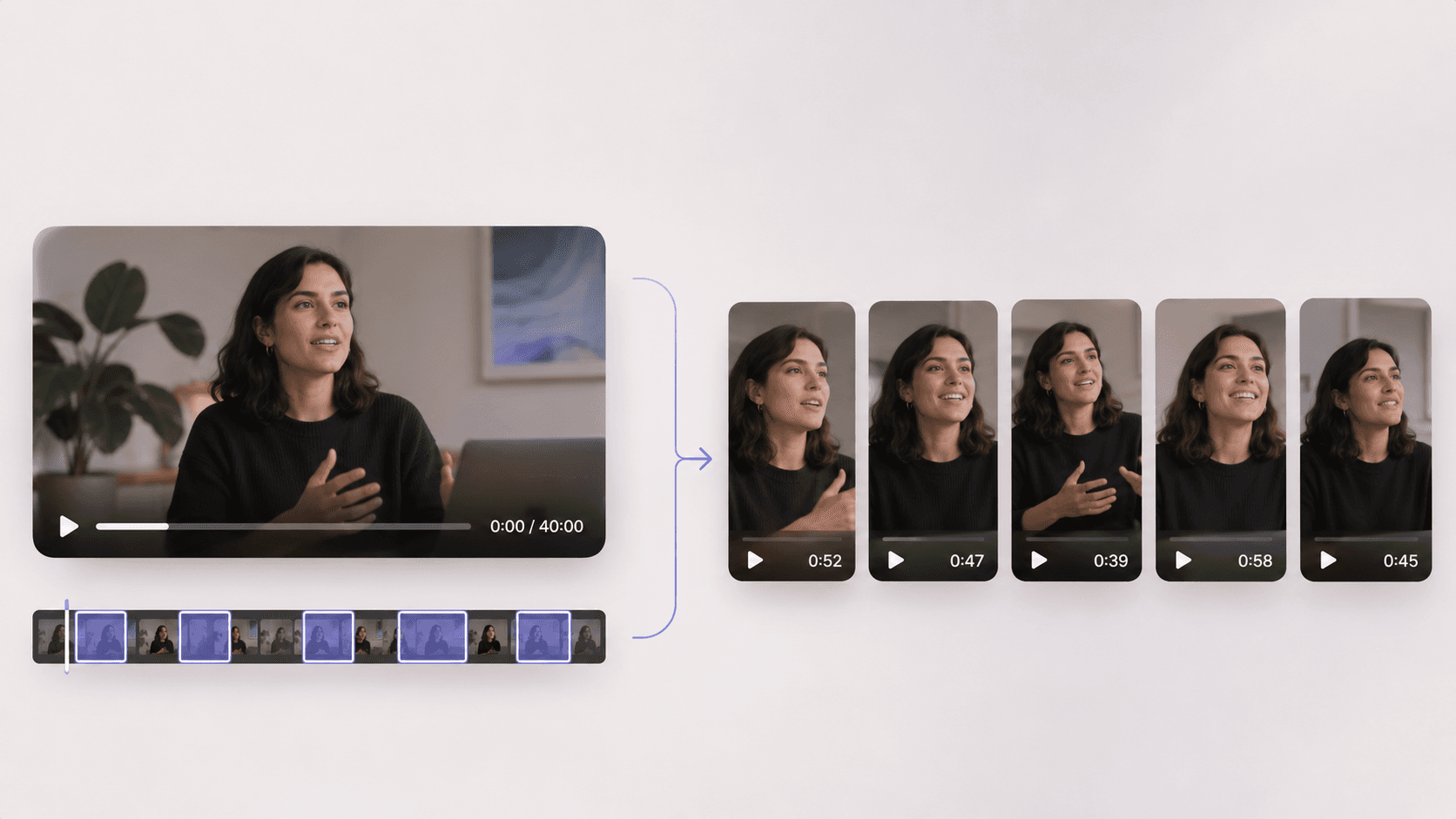
Turn long footage into social clips by selecting complete ideas and cutting each into a standalone segment. For a 40-minute webinar, aim for five clips lasting 30 to 60 seconds.
- Transcribe the recording and mark quotable moments.
- Trim filler words and pauses without changing the meaning.
- Reframe vertically, keeping the speaker visible.
- Add captions sized for mobile reading.
Watch each clip on its own. Keep enough context for viewers who missed the full conversation.
How Do You Edit an Event or Product Launch Recap?
For an event or product launch recap, choose 10 to 20 strong shots and aim for 60 to 90 seconds.
- Log crowd reactions, speakers and product moments.
- Sequence shots from arrival through the peak moment to the close.
- Cut to one music track’s beat, then finish with a title and logo.
Turn 2 hours of conference footage into a 60-second aftermovie for LinkedIn and Instagram. For sports recaps, add slow motion and score overlays. The same cutting approach works when you make a promo video for a launch.
How Can Marketers Edit Phone Footage and Product Shots?
Edit phone footage and product shots with clean audio, consistent framing and tight cuts.
For a cooking video:
- Shoot overhead and close-up angles.
- Cut each step to a few seconds.
- Add ingredient text and voiceover, then export vertically.
For a spinning product shot, film the item on a turntable. Alternatively, animate a product photo into a 3D-style spin with an AI image-to-video tool. Check generated labels, logos and proportions before using it in an ad.
Which AI Editing Features Actually Save Marketers Time?
Use AI editing features to handle repetitive work, then review the results:
- Use the transcript to select and cut spoken lines.
- Remove filler words and long pauses, then listen for unnatural cuts.
- Generate captions, then correct their wording and timing.
- Apply smart reframing, then check the crop in each shot.
- Search the recording for a spoken phrase, then review the surrounding context.
For a 10-minute demo, compare manual captioning against AI generation plus corrections. Before publishing, check product names, second-speaker crops, and context lost during automatic clip selection.
How Do You Keep Marketing Videos On Brand Across a Team?
Keep marketing videos on brand with a reusable template for fonts, colors, captions, logo placement and intros/outros.
Before exporting a product demo, run this checklist:
- Apply your team’s caption preset.
- Place the logo in the last 3 seconds.
- Use approved music.
- Match CTA wording to the brief.
- Check the intended aspect ratio.
Ask stakeholders for timestamped comments on the review cut. Assign one person to resolve conflicting feedback before you revise.
What Is the Best Video Editing Software for Marketers?
The best video editing software for marketers depends on your footage: a product walkthrough needs precise cuts; a sale announcement may suit templates.
- Free desktop editors offer control; check hardware requirements.
- Browser template editors suit social posts; check layout flexibility.
- Mobile apps suit phone footage; long timelines get cramped.
- Clipping tools extract clips; broader edits may need another tool.
- Request-based AI editors build first cuts; review creative choices.
- Professional editors suit finishing; expect learning time.
Are Free Video Editing Tools Enough for Marketers?
Free video editing software for marketers can cover occasional social posts; weekly publishing may expose limits.
Before editing a nonprofit fundraiser clip, check each tool’s pricing page and record the date. Compare:
- Watermarks and resolution caps on finished videos.
- Export allowances against your publishing schedule.
- Stock media licensing for your intended use.
- Brand kits and team review options.
If you need 4K, check free access before budgeting for upgrades. Ask vendors about nonprofit discounts. If you’re outgrowing a transcript-based editor, review these Descript alternatives.
Should Marketers Learn to Edit, Hire an Editor or Use AI?
Video editing for marketers usually calls for a mix of basic skills, AI and professional help:
- Learn basic editing for quick revisions. Budget staff time and check quality yourself.
- Use AI for volume. Budget subscriptions and review every cut.
- Hire an editor for story-driven films or complex color and sound. Budget project fees and feedback rounds. If you’re weighing a traditional timeline tool against AI, see Premiere Pro vs Cardboard.
Keep weekly demo clips in-house; hire out a quarterly brand film. Allow extra time for external reviews.
How Do You Know If Your Video Edits Are Working?
Judge your video edits by retention, completion rate and click-through, then use each result to choose a revision.
- An early retention drop suggests revising the hook.
- A mid-video dip suggests cutting a slow section.
- Low completion suggests testing a shorter edit.
- Few clicks despite completions suggest clarifying the CTA.
Compare question and product-first openings on a 30-second product ad. Keep everything else, including audience and spend, consistent. Use the winner in your next template.
How Does Cardboard Fit Into Your Marketing Video Workflow?
Cardboard supports video editing for marketers using your existing footage, including through Cardboard’s ChatGPT connector, which lets you attach clips in a chat and ask for an edit that plays right there. It’s in early access and may not be available on every account. Edit ads, social clips and recaps by chat or by hand:
“Make three vertical clips from this podcast, each with one complete idea.”
Remove filler words, reframe clips and add captions.
Windows users use the web editor. As of November 2026, Lite is free in the Apple Silicon Mac app. If you have no footage and want an AI presenter reading a script, use an avatar tool rather than Cardboard.
FAQ
What is the best video editing software for marketers who edit ads, social clips and recaps from their own footage?
It depends on how often you publish and what your footage looks like. Free desktop or browser editors cover occasional social posts, but for weekly publishing, a request-based AI editor like Cardboard AI builds a first cut from your existing footage by chat. For a product demo, you’d type something like “Cut this into a 20-second ad” and get an editable timeline back.
Can I build three versions of a video ad with different hooks without re-editing the whole thing?
Yes, in Cardboard you ask it to change only the opening of each version: for example, “Make three versions of this 20-second testimonial ad with different opening lines, keeping everything after the first 3 seconds the same.” Keep audience and spend consistent across all three so the results tell you which hook to use next.
How do I turn a 40-minute webinar into standalone social clips without losing context for viewers who missed the full session?
Transcribe the recording and mark five to eight moments that each carry a complete idea, then trim each to 30 to 60 seconds. Remove filler words and pauses, reframe vertically, and add captions sized for mobile reading. Watch each clip on its own before publishing to check that the meaning holds without the surrounding conversation.
Cardboard AI vs a freelance editor for weekly marketing video: which fits better?
For weekly demo clips and social cuts, Cardboard fits better because you can go from raw footage to an editable first cut in one chat request and review it yourself. A freelance or agency editor fits better for story-driven brand films or complex color and sound work, where the feedback rounds and craft time are worth the project fee.
How do I keep marketing videos on brand across a team using Cardboard?
Build a reusable checklist and apply it before every export: caption preset, logo in the last 3 seconds, approved music, CTA wording matched to the brief, and the correct aspect ratio. Share the Cardboard project link for timestamped comments so reviewers don’t need an account, and assign one person to resolve conflicting notes before you revise.
How Can You Keep Your Marketing Videos Moving?
A repeatable editing routine keeps your marketing videos moving. You can reuse caption styles across weekly demo clips and refine each cut with viewer feedback. Before exporting each week’s demo clip, run the on-brand checklist above: check captions, logo placement, music, CTA wording and aspect ratio.
Open your cut in Cardboard’s web editor and share it for review.